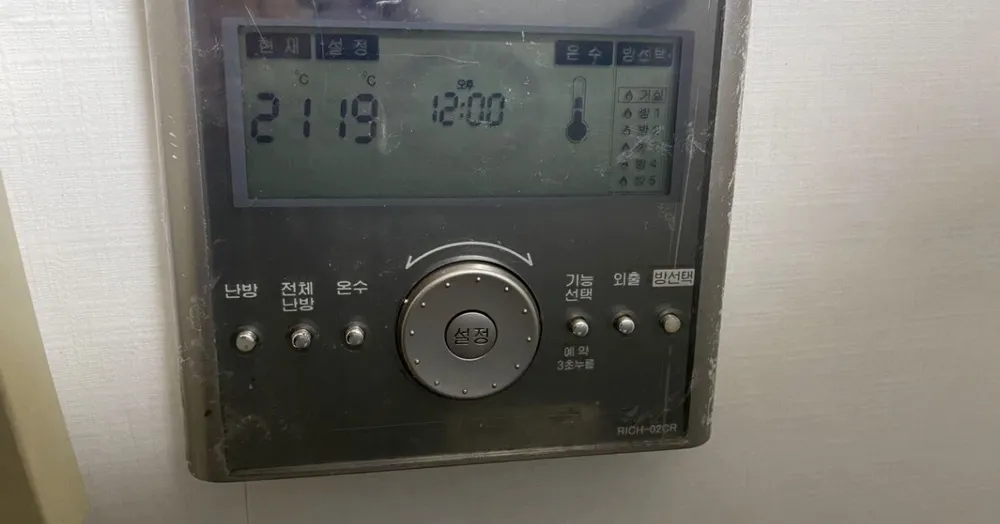
The living-room master of an older Rinnai multi-room system: it controls every room's floor valve AND the Rinnai gas boiler (hot water, heating-water temperature) with a big dial.
We could not find this exact model's manual, so these steps come from its closest sibling. If your panel behaves differently, send us a photo.
What does each button do?
1Hot-water indicator · 온수onsuShows that boiler hot water is switched on.
2Current temp · 현재hyeonjaeRoom temperature now (21°C).
6Room list · 거실 · 방1-5geosil · bangLiving room and rooms 1-5. A drop or flame mark beside a room = that room is heating.
7Heating · 난방nanbangTurns heating on/off for the selected room.
8All-room heating · 전체난방jeonche nanbangSwitches heating on or off for every room at once.
9Hot water · 온수onsuTurns the boiler's hot-water supply on or off.
10Dial + Set · 설정seoljeongTurn to change the value (temperature, time). Press the centre 설정 to confirm.
11Function / hold 3 s = reservation · 기능선택 (예약 3초 누름)gineung seontaekShort press cycles functions such as hot-water temp, heating-water temp and heating method. Hold 3 s for reservation (delayed heat).
12Away · 외출oechulAway mode: low-level frost protection while out.
13Room select · 방선택bangseontaekSteps through 거실/방1-5 so you can set each room here.
What setting should I use?
All rooms on, 21-22°C in used rooms and 18°C elsewhere. Hot water about 45°C. Use 외출 for trips, never the boiler power plug.
How do I…?
Turn it on
1Press 전체난방 to switch on every room, or press 방선택 to pick a room and then press 난방.
Heat the room to a set temperature
1Press 방선택 until the room you want is highlighted (거실 = living room).
2Turn the dial until 설정 reads 22.
3Press the centre 설정 button to confirm.
Leave for a few days
1Press 외출. On the newer Rinnai system in this family, Away gives 5 minutes of heat about every 2 hours (unverified on RICH-02CR).
2Press 외출 again when you are back.
Run on a timer
1Hold 기능선택 for 3 seconds (예약).
2Turn the dial to set hours.
3Press 설정. Heating stays off for that time and then starts (unverified on this exact model).
Hot water only (summer)
1Press 전체난방 to switch room heating off.
2Make sure 온수 shows on the screen; if not, press 온수. Hot water keeps working with heating off.
Change the hot-water temperature
1Press 기능선택 repeatedly until hot-water temperature (온수 온도) flashes.
2Turn the dial to set it (about 45°C is comfortable and safe).
3Press 설정 to confirm.
Turn it off
1Press 전체난방 to turn all rooms off, or 난방 for just the selected room.
What do the words on the screen mean?
현재 / 설정
Current / Set
Room temperature now / target.
온수
Hot water
Boiler hot water enabled.
거실, 방1-방5
Living room, rooms 1-5
Zones; a mark beside one means that room's valve is open and it is heating.
오전/오후
AM/PM
Clock.
What trips people up on this model?
This panel controls the boiler too: turning 온수 off means no hot shower even though the boiler is fine.
Settings apply to the room highlighted by 방선택. Check the room before turning the dial.
RICH-02 is discontinued (replaced by RICH-04 / RICH-W). Repairs usually mean replacing the whole set.
It shows an error. Now what?
Boiler error codes appear on this panel or on the boiler itself. Report the code to Rinnai A/S.
Service line (Korean): Not printed on panel. Rinnai Korea customer centre 1544-3651.