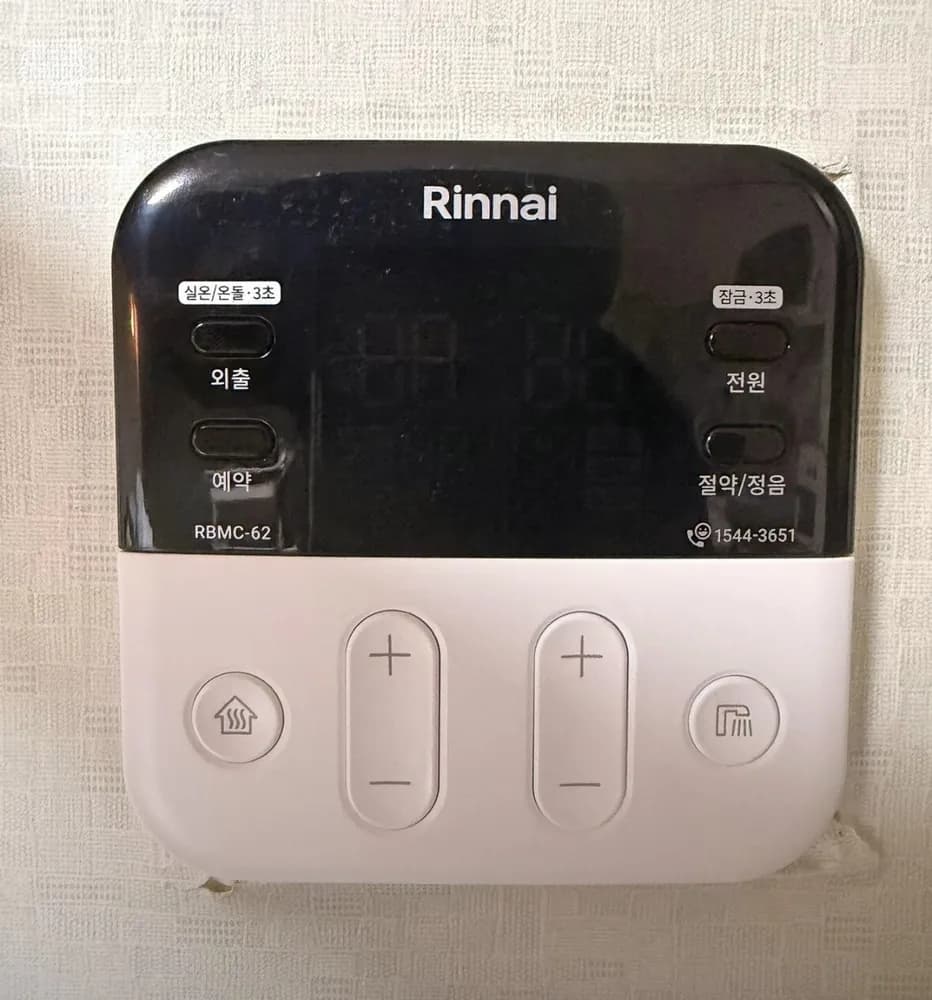
A modern black-and-white Rinnai panel (for RC610 boilers): heating key and +/− on the left, hot water key and +/− on the right, and four small keys on the black glass — 외출, 예약, 전원, 절약/정음.
What does each button do?
1Away / hold 3 s = mode · 외출 (실온/온돌 · 3초)oechul (sil-on/ondol 3 cho)Tap: away mode (minimum heat every 4 hours). Hold 3 seconds: swap room-air ↔ floor mode.
2Timer · 예약yeyakWith heating on, each press steps through 3 presets: every 2 h for 20 min, every 4 h for 30 min, every 6 h for 40 min. Press again to cancel.
3Screen · 표시부pyosibuHidden under the black glass; lights up when on. Shows heating °C, hot water °C and mode icons.
4Power / hold 3 s = lock · 전원 (잠금 · 3초)jeonwon (jamgeum 3 cho)Tap: controller on/off. Hold 3 s: child lock (lock icon); hold 3 s again to unlock.
5Saving / quiet · 절약/정음jeoryak/jeong-eumSaving mode: limits heating to max 25°C room / 60°C floor and spaces out burning to cut gas. Press again to cancel.
6Rinnai A/S · 1544-3651—Service number.
7Heating on/off · 난방 (집 버튼)nanbangPress to start or stop heating. Hold 3 s = rapid heat (max temperature for 25 minutes, then back).
10Hot water up · 온수 +onsuRaise hot water (30–60°C).
11Hot water down · 온수 −onsuLower hot water.
12Hot water on/off · 온수 (샤워 버튼)onsuPress to switch hot water on/off. Hold 3 s = preheat hot water for 30 minutes.
What setting should I use?
Room mode 22°C; hot water 40–45°C. In mild weather, 예약1 in floor mode at 50°C.
How do I…?
Turn it on
1Tap 전원. The screen lights.
2Press the house key to start heating.
Heat the room to a set temperature
1If the floor icon shows, hold 외출 for 3 seconds to switch to room mode.
2Press the house key.
3Use the left +/− until it reads 22.
Use floor (ondol) mode
1Hold 외출 for 3 seconds until the floor icon shows.
2Press the house key and set 50–55 with the left +/−.
Leave for a few days
1Tap 외출. The away icon lights; minimum heat every 4 hours.
2Cancel: tap 외출 or the house key.
Run on a timer
1Turn heating on (house key).
2Press 예약: 예약1 = 20 min every 2 h → 예약2 = 30 min every 4 h → 예약3 = 40 min every 6 h.
3Wait 3 seconds — it starts.
4Cancel: press 예약 while it runs.
Hot water only (summer)
1Press the house key so heating is off.
2Press the shower key so hot water is on.
Change the hot-water temperature
1Right +/− (30–55°C while a tap runs).
2For 60°C: close the hot tap first, then press +.
Turn it off
1Press the house key (heating) or the shower key (hot water). Tap 전원 for everything.
2Panel won't switch off? Child lock is on — hold 전원 3 s.
What do the words on the screen mean?
집 아이콘
Room mode
Room-air heating; number is current room temperature.
온돌 아이콘
Floor mode
Floor-water heating; number is the set water temperature.
불꽃
Burning
Burner firing.
외출
Away
Away mode on.
절약
Saving
Saving mode on.
예약 1/2/3 + 시간
Timer preset
Which timer pattern is running.
자물쇠
Lock
Child lock on — hold 전원 3 s to unlock.
눈송이 (깜박임)
Frost alert
Frost-protection is running; check the boiler area isn't freezing.
우선
Priority
Two controllers installed; this one is in charge.
What trips people up on this model?
외출 does two things: tap = away, hold 3 s = room/floor swap. A long press by mistake changes the mode.
전원 held 3 s = child lock. Buttons then 'do nothing' and the lock icon blinks.
절약 caps room heat at 25°C — if the room never gets warm, check 절약 is off.
Factory defaults: room 22°C, floor 52°C.
It shows an error. Now what?
If the boiler stops and a number blinks on the screen, read the number. 11 = no ignition: check the gas valve on the pipe is open (handle parallel to the pipe), then switch heating off and on. 14 = overheat cut-out: wait up to 30 min, then switch on again. 16 = water overheating: open at least one floor-zone valve on the manifold and bleed air. Anything repeating: call Rinnai A/S 1544-3651.