Daesung Celtic DSR-225E in English

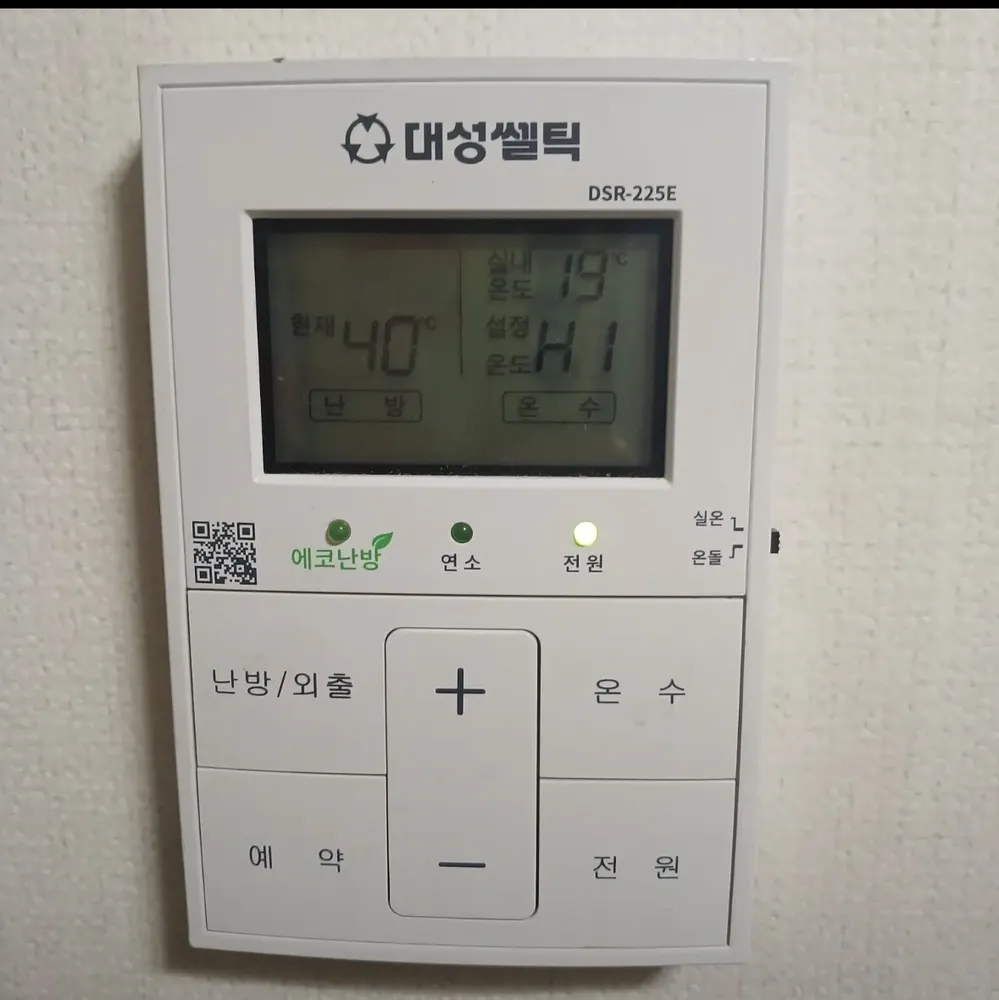
An older Daesung panel with a grey LCD, three status lamps, five big buttons and a small slide switch on the right edge for room vs floor mode.
What does each button do?

Daesung Celtic DSR-225E boiler control panel in a Seoul home
  1. 1LCD screen · 표시창pyosichangShows current temperature (현재), room temperature (실내온도) and the setting (설정온도) for heating (난방) or hot water (온수).
  2. 2Eco heating lamp · 에코난방eko nanbangLights when floor mode is set to 56–59°C, Daesung's most efficient range.
  3. 3Burning lamp · 연소yeonsoLights while the boiler flame is on.
  4. 4Power lamp · 전원 램프jeonwon raempeuLights when the controller is on.
  5. 5Room / Floor switch · 실온 / 온돌 스위치siron / ondolSmall slide switch on the right edge. Up = 실온 (room-air mode), down = 온돌 (floor-water mode).
  6. 6Heating / Away · 난방/외출nanbang/oechulFirst press shows the heating setting. In heating, press once for Away, press again for hot-water-only.
  7. 7Up · +peulleoseuRaises the blinking setting.
  8. 8Hot water · 온수onsuMakes the hot-water setting blink so you can change it.
  9. 9Timer · 예약yeyakRepeating timer: 20 minutes of heating, then a 1–6 hour pause. Press again to end.
  10. 10Down · −maineoseuLowers the blinking setting.
  11. 11Power · 전원jeonwonTurns the controller on or off.

What setting should I use?

Floor mode (switch down) at 58°C so the 에코난방 lamp is on; hot water 43°C; 예약 3 h when out for the day in winter.

How do I…?

Turn it on

  1. 1Press 전원 (bottom right). The 전원 lamp lights.

Heat the room to a set temperature

  1. 1Slide the small switch on the right edge UP (실온).
  2. 2Press 난방/외출. 설정 and the heating setting blink.
  3. 3Press + or − to set 22 (range 10–40°C).

Use floor (ondol) mode

  1. 1Slide the right-edge switch DOWN (온돌).
  2. 2Press 난방/외출, then + / − to 58 (range 50–80°C). 56–59 lights the 에코난방 lamp.

Leave for a few days

  1. 1While heating, press 난방/외출 once. The heating setting disappears — Away is on.
  2. 2The boiler keeps the heating water at 10°C or more to stop freezing.
  3. 3Press 난방/외출 to move on; to get heating back, press until the heating setting shows again.

Run on a timer

  1. 1Press 예약.
  2. 2Press + / − to choose the pause: 1 to 6 hours.
  3. 3The boiler heats 20 minutes at a fixed 80°C water temperature, pauses that many hours, and repeats.
  4. 4Press 예약 again to end and return to heating.

Hot water only (summer)

  1. 1While heating, press 난방/외출 twice (Away, then hot-water-only).
  2. 2The hot-water setting blinks; set it with + / −.

Change the hot-water temperature

  1. 1Press 온수. The setting blinks.
  2. 2Press + / −: 37–45°C in 1°C steps, 45–65°C in 5°C steps. 40–45 is plenty.

Turn it off

  1. 1Press 전원. The 전원 lamp goes out.

What do the words on the screen mean?

현재CurrentCurrent temperature being controlled.
실내온도Room tempAir temperature at the controller.
설정온도Set tempYour target; blinks while you change it.
난방HeatingHeating is active / heating value shown.
온수Hot waterHot-water value shown.
에코난방 (green)EcoFloor setting is in the 56–59°C economy band.
연소 (green)BurningFlame on.

What trips people up on this model?

  • The 실온/온돌 switch is on the side of the case — easy to miss.
  • Heating only runs when the setting is above the current temperature.
  • Pressing 난방/외출 during 예약 cancels the timer and goes to Away.
  • Timer runs always use 80°C water, so they are hotter than you might expect.

It shows an error. Now what?

Not sourced for this model. Note any code on the LCD and call Daesung on 1588-8577.

Service line (Korean): 1588-8577 (Daesung; not printed on this panel)

Other Daesung Celtic panels

Read the full Korean heating guide →

Can't find your panel?

Send one photo. We reply with your panel in English.

By sending, you agree to our Privacy Policy.

Sources