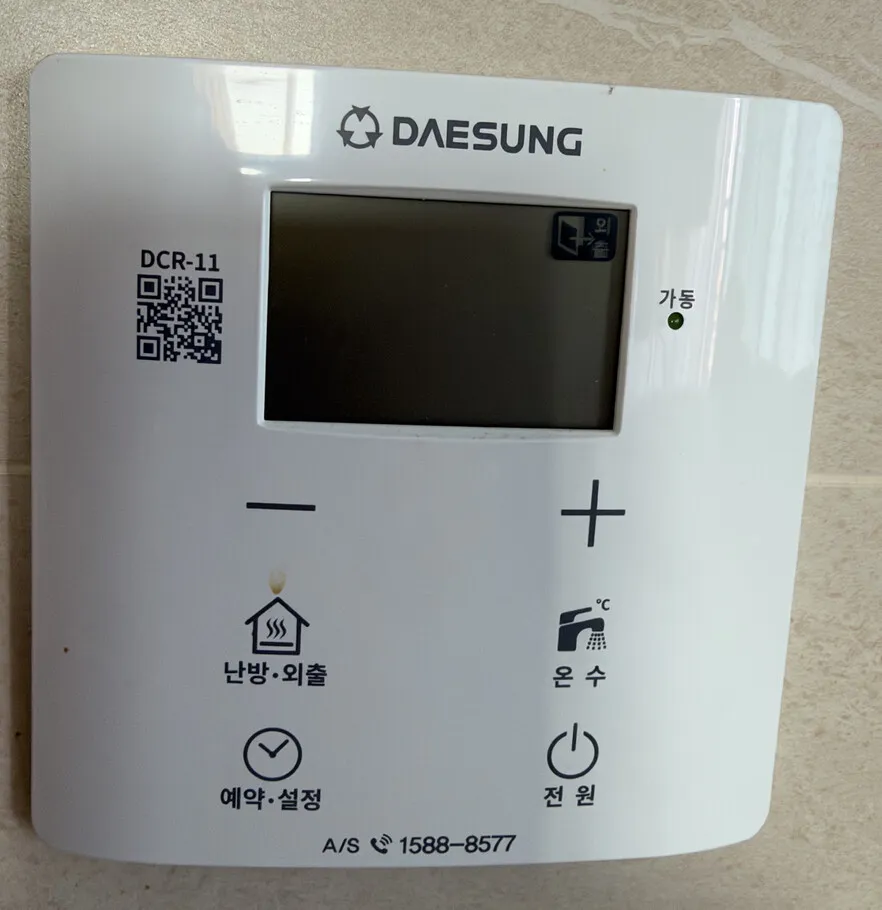
A newer white Daesung controller with a plain screen and six buttons: − and + change whatever is selected, and four labelled buttons pick heating, hot water, timer and power.
What does each button do?
1Screen · 표시창pyosichangShows the current mode and temperature. A flame (연소) icon appears while the burner is firing.
2Away icon · 외출oechulLit when the boiler is in Away mode, which mainly protects pipes from freezing.
3Running light · 가동gadongGlows green while the boiler is actually heating.
4Down · −Lowers the setting that is showing: room or floor temperature, hot water, or timer values.
5Up · +Raises the setting that is showing.
6Heating / Away · 난방·외출nanbang·oechulPress to switch heating on. Press again to step to Away mode, and again to Hot water only (only the hot-water temperature shows).
7Hot water · 온수onsuPress, and the hot-water temperature blinks; set it with − / + (37–45°C in 1° steps, 45–60°C in 5° steps).
8Timer / Settings · 예약·설정yeyak·seoljeongPress for timer heating: set 'every 1–12 hours, run 5–60 minutes' with − / +.
9Power · 전원jeonwonTurns the screen and the boiler on or off. Off stops both heating and hot water, so leave it on in winter.
What setting should I use?
Room mode at 20°C, hot water 40–45°C, power on all winter. Away for trips of several days, not for a day at work.
How do I…?
Turn it on
1Press 전원 (bottom right). The screen lights up.
Heat the room to a set temperature
1Press 난방·외출 until the heating screen shows (no 외출 icon).
2Press − or + to set about 20°C (room mode range is 10–40°C).
3Wait. It saves by itself; the green 가동 light shows it is heating.
Use floor (ondol) mode
1Room and floor mode are switched with the power OFF: press 전원 to turn the screen off.
2Hold 예약·설정 and 온수 together for 5 seconds.
3Turn it back on with 전원; set the floor-water temperature with − / + (50–80°C). Start around 60°C.
Leave for a few days
1Press 난방·외출 until the 외출 icon appears in the top-right of the screen.
2To come back, press 난방·외출 again.
Run on a timer
1Press 예약·설정. The 예약 icon appears.
2Use − / + to set how often (every 1–12 hours) and how long it runs (5–60 minutes).
3Example: every 3 hours, run 20 minutes.
Hot water only (summer)
1Press 난방·외출 repeatedly until only the hot-water temperature is on the screen.
2Set the temperature with − / +.
Change the hot-water temperature
1Press 온수. The hot-water temperature blinks.
2Press − or + (37–45°C in 1° steps, 45–60°C in 5° steps). 40–45°C is plenty for showers.
3Stop pressing; when the blinking stops it is saved.
Turn it off
1To stop heating but keep hot water, set the room temperature below the current temperature, or use 온수전용 (hot water only).
2Press 전원 only if you really want both heating and hot water off. Never in a freezing week.
What do the words on the screen mean?
연소
Burning
The burner is firing right now. Normal.
예약
Timer
Timer heating is on; the screen shows the cycle (hours) and the run time (minutes).
외출
Away
Away mode is on; the boiler heats only to stop freezing.
가동 (green light)
Running
Heating is running.
What trips people up on this model?
Room/floor mode only switches with the power OFF: hold 예약·설정 + 온수 for 5 seconds.
난방·외출 is one button that cycles heating → away → hot water only. If the room is cold, check you did not leave it on 외출.
전원 off stops hot water too.
Timer runs for the set minutes every cycle no matter the room temperature, so 'every 1 hour, 60 minutes' is effectively always on.
It shows an error. Now what?
Note the number on the screen, switch off with 전원, wait a minute, switch on. If it returns, call Daesung A/S 1588-8577 or your landlord.