Kiturami NCTR-70 expliqué

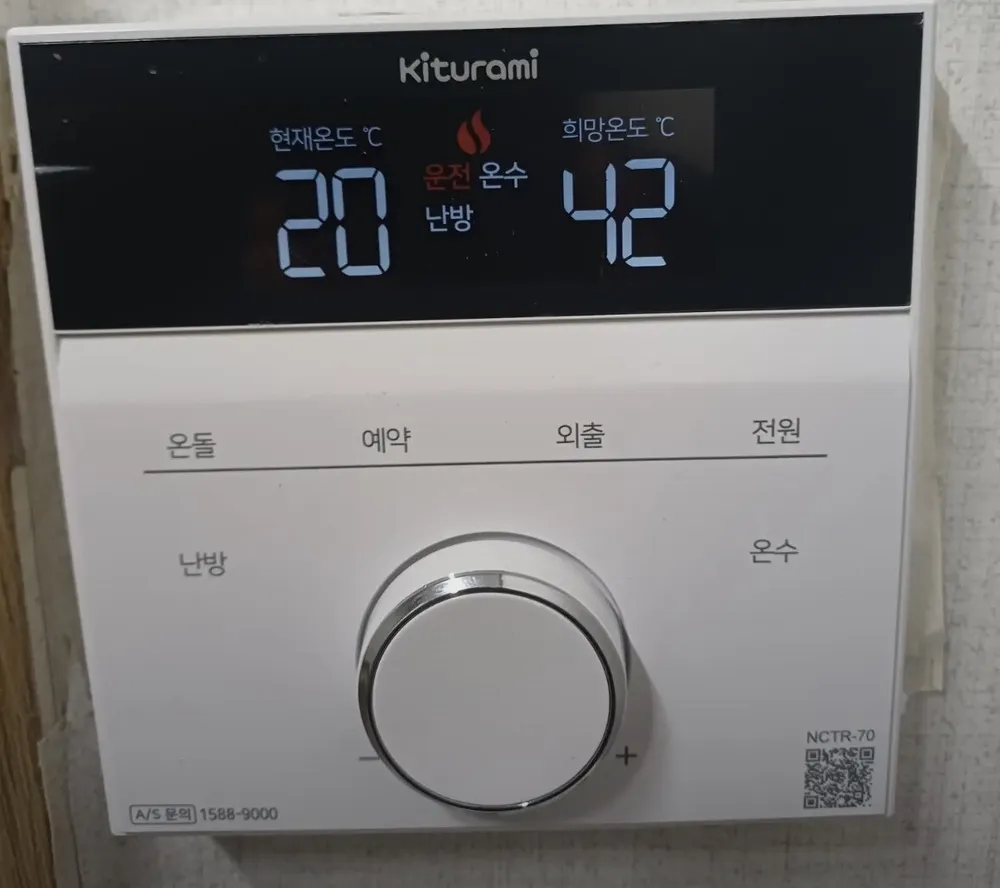
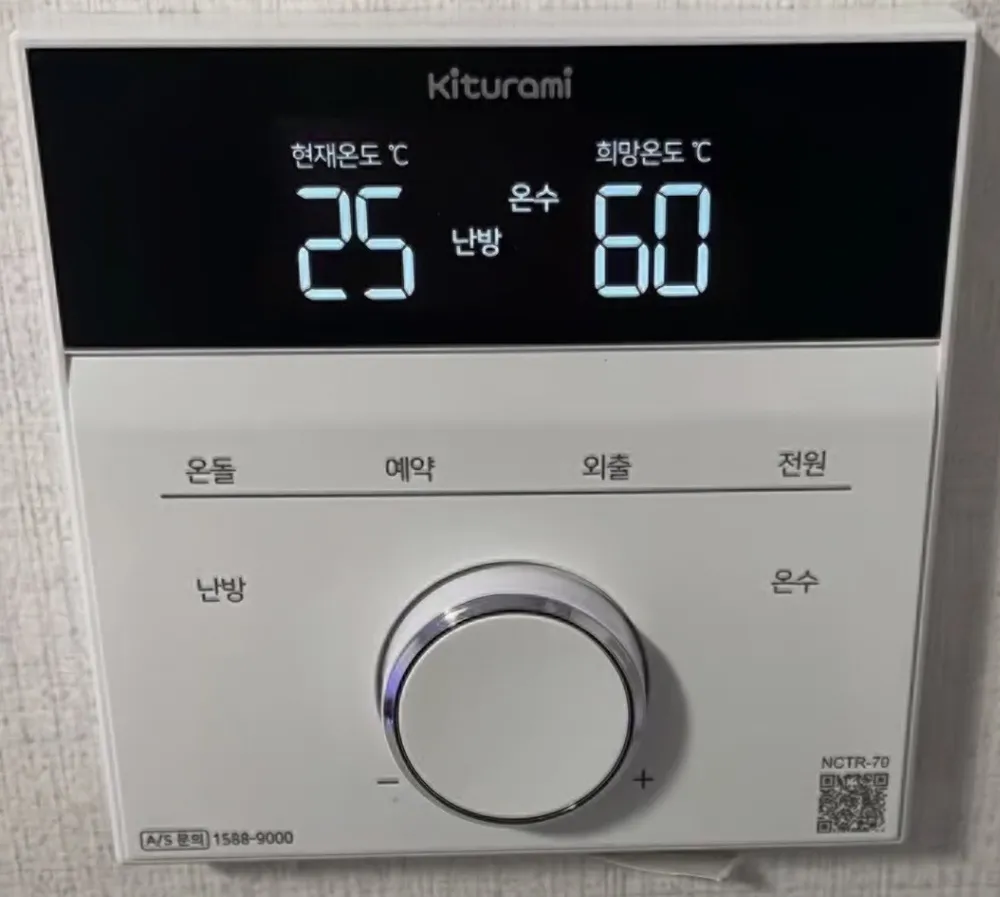
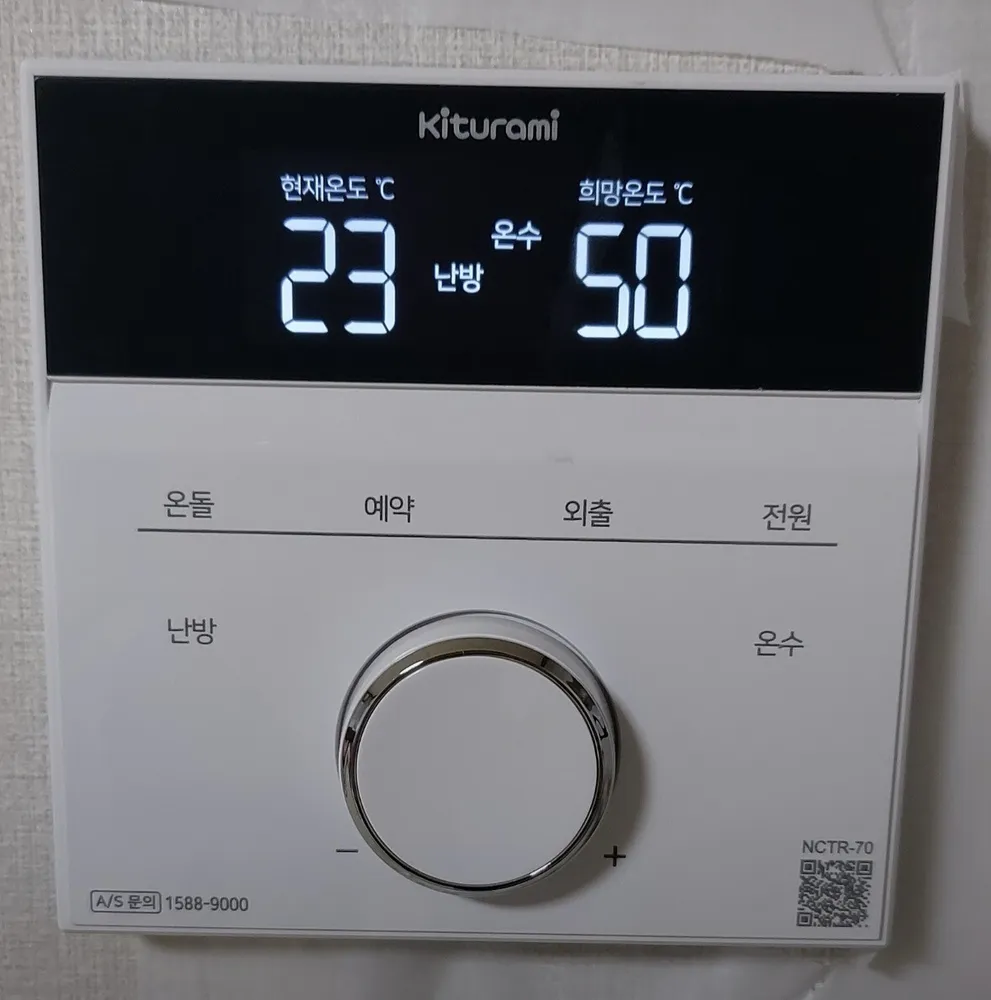
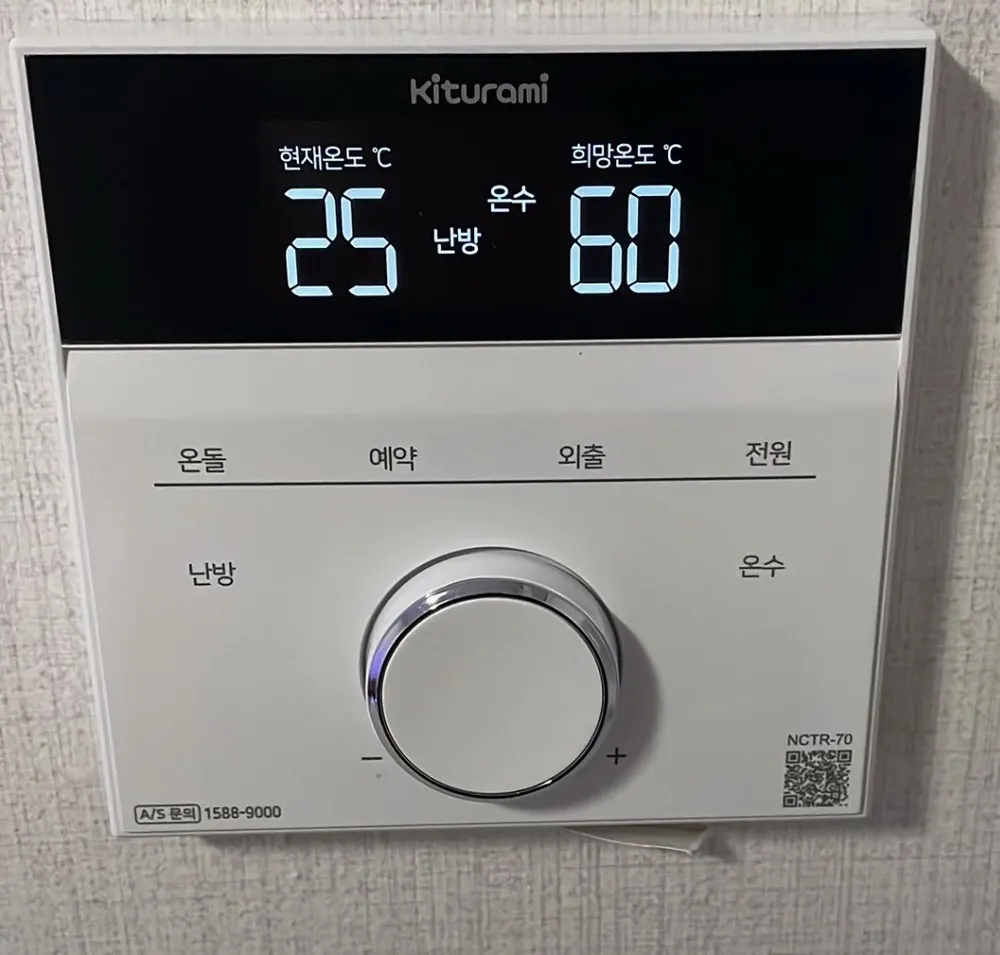
A modern white Kiturami controller: tap the printed words to pick a mode, turn the silver dial to change the number, then press the dial to save.
À quoi sert chaque bouton ?

Panneau de chaudière Kiturami NCTR-70 dans un logement à Séoul
  1. 1Current temp · 현재온도hyeonjae ondoLeft number. Room temperature now (in 온돌 mode it shows the floor-water temp instead).
  2. 2Active mode words · 난방 / 온수 / 외출nanbang / onsu / oechulMiddle words show what is on: 난방 = room heating, 온돌 = floor mode, 온수 = hot water, 목욕 = bath, 외출 = away, 운전 = boiler running.
  3. 3Set temp · 희망온도huimang ondoRight number. Usually the hot-water temperature you set (e.g. 60).
  4. 4Floor mode · 온돌ondolHeats by floor-water temperature and ignores the room sensor. Turn the dial to 45–85°C, then press the dial.
  5. 5Repeat timer · 예약yeyakRuns the boiler X minutes, rests Y hours, repeats. Each press switches between the minutes-on and hours-off value.
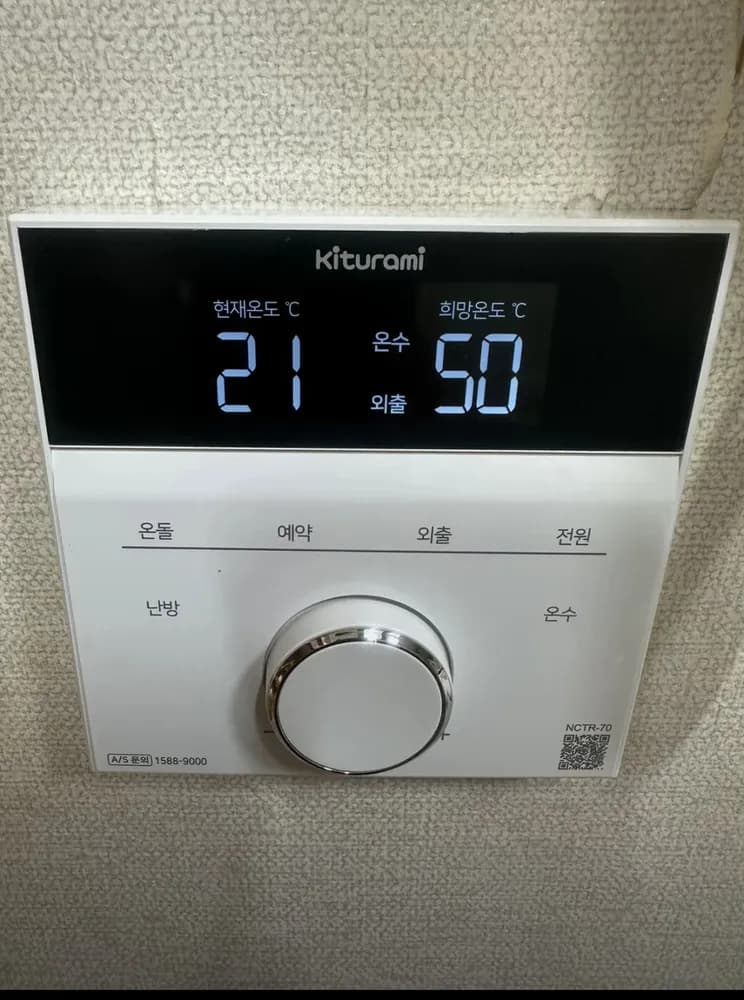
  6. 6Away · 외출oechulHolds the room at a fixed 8°C to stop pipes freezing.
  7. 7Power · 전원jeonwonTurns the controller and boiler on/off; also restarts after an error.
  8. 8Room heating · 난방nanbangRoom-thermostat mode. Tap, turn the dial to 10–45°C, press the dial. Hold about 5 s to switch to summer hot-water-only.
  9. 9Hot water / Bath · 온수onsuTap once: turn the dial to set hot-water temp, press the dial. Tap twice: 목욕 (bath) mode.
  10. 10Dial (turn + press) · 다이얼daieolTurn left (−) or right (+) to change the flashing number. Press the dial in to confirm and finish.

Quel réglage choisir ?

Winter: 난방 at 21–22°C. If the controller sits near a door, window or heater, use 온돌 at 70–80°C instead. Hot water 42–45°C. Out for the day: 외출.

Comment… ?

Allumer

  1. 1Tap 전원 (top right word).
  2. 2The screen lights up.

Chauffer la pièce à une température

  1. 1Tap 난방 (left side word).
  2. 2Turn the dial until the number shows 22 (range 10–45°C).
  3. 3Press the dial in to save. The screen goes back to showing the current room temp.

Mode sol (ondol)

  1. 1Tap 온돌.
  2. 2Turn the dial to the floor-water temp: about 75–85 in deep winter, 70–80 in early winter, 65–75 autumn, 60–70 spring (manual table; range 45–85°C).
  3. 3Press the dial to save.

Partir quelques jours

  1. 1Tap 외출. The screen shows 외출.
  2. 2The boiler now holds the room at 8°C. Leave the power on.
  3. 3In a hard freeze, Kiturami suggests 난방 at 10°C instead.

Programmer

  1. 1Tap 예약. The screen shows an alarm-clock icon and two numbers.
  2. 2The flashing number is the one you are changing. Tap 예약 again to swap between them.
  3. 3가동 (minutes) = how long it RUNS, 10–90 min. 정지 (hours) = how long it RESTS, 1–24 h.
  4. 4Turn the dial to set each value, then press the dial to finish.
  5. 5Example from the manual: 20 min on, 2 h off, repeating.

Eau chaude seule (été)

  1. 1Press and HOLD 난방 for about 5 seconds.
  2. 2The screen shows only 온수 — heating is off, taps still get hot water.
  3. 3To get heating back, tap 난방 once (or 예약 / 온돌).

Régler l'eau chaude

  1. 1Tap 온수 once.
  2. 2Turn the dial: 35–60°C on instant (순간식) boilers, 55–80°C on tank (저탕식) boilers. 42–45°C is a good shower temp.
  3. 3Press the dial to save.
  4. 4Bath: tap 온수 twice for 목욕 (very hot 50–60°C water, back to normal after 2 h 30 min).

Éteindre

  1. 1Tap 전원. In winter use 외출 instead, so pipes stay safe.

Que signifient les mots à l'écran ?

현재온도 ℃Current tempRoom temp now (floor-water temp in 온돌 mode).
희망온도 ℃Set tempThe temperature you set — usually hot water.
난방Room heatingRoom-thermostat heating is on.
온돌Floor modeHeating by floor-water temperature.
온수Hot waterHot water is available (works in every mode).
목욕BathExtra-hot water; returns to the previous mode after 2 h 30 min.
외출AwayFrost protection, fixed 8°C.
운전 + flame iconRunning / burningThe boiler is firing right now.
alarm-clock icon, 가동 __분 / 정지 __시Timer예약 is on: runs __ minutes, rests __ hours.
$SavingEco/saving indicator (not explained further in the quick manual).
OFOff (2-room setup)In a two-controller home, the controller NOT in charge shows OF.

Les pièges de ce modèle

  • The words 온돌/예약/외출/전원/난방/온수 ARE the buttons — tap the printed word itself; there are no raised buttons.
  • Turning the dial alone does nothing permanent — press the dial in to confirm.
  • Summer hot-water-only is a 5-second HOLD on 난방, not a separate button.
  • 외출 is a fixed 8°C — fine for a few days, but in extreme cold set 난방 to 10°C instead.
  • The big right-hand number is usually the HOT WATER temp (e.g. 60), not the room — don't panic that the room is set to 60.
  • Photo 77: screen shows 온수 + 외출 = the home is in away mode; tap 난방 to get heat back.

Un code erreur s'affiche ?

Faults show as a code on the screen. The NCTR-70 quick manual does not list codes; tap 전원 off/on once to restart, and call 1588-9000 if the code returns.

Service après-vente (coréen) : 1588-9000
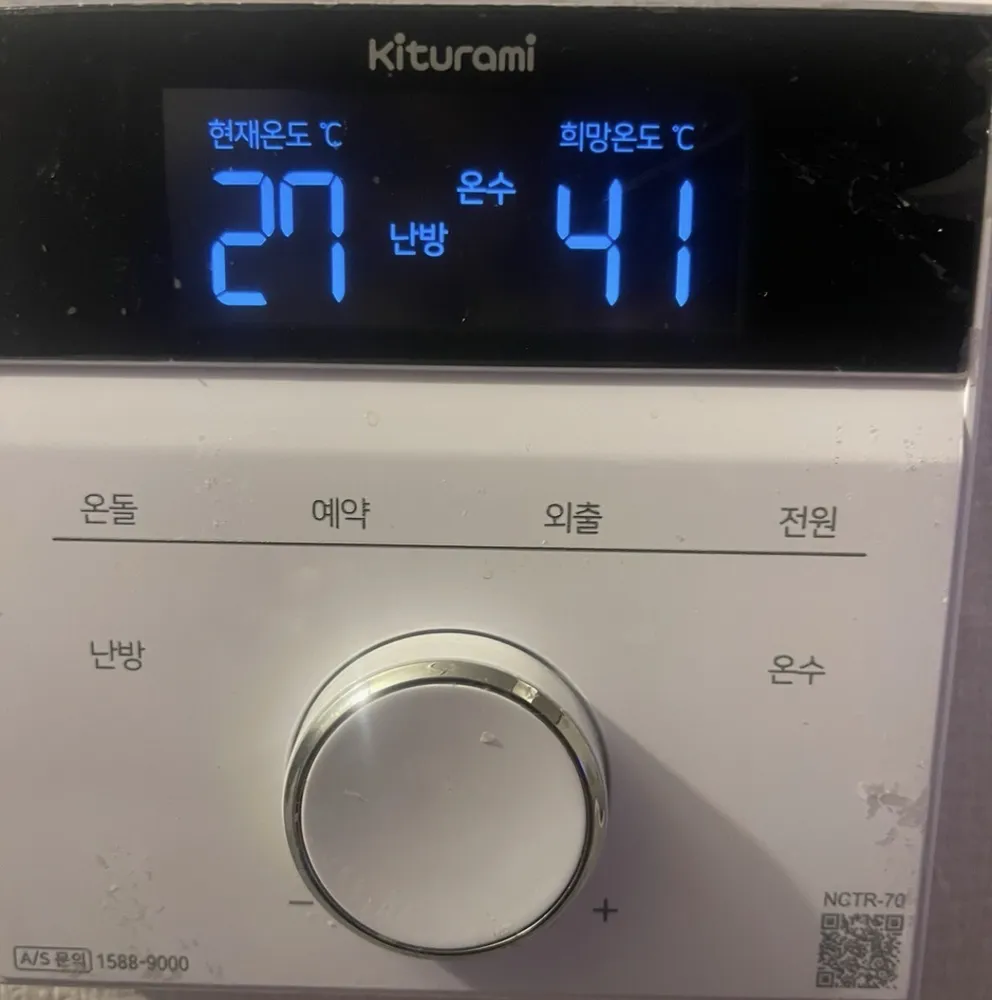
Panneau de chaudière Kiturami NCTR-70 dans un logement à SéoulPanneau de chaudière Kiturami NCTR-70 dans un logement à SéoulPanneau de chaudière Kiturami NCTR-70 dans un logement à SéoulPanneau de chaudière Kiturami NCTR-70 dans un logement à SéoulPanneau de chaudière Kiturami NCTR-70 dans un logement à Séoul

Autres panneaux Kiturami

Lire le guide complet du chauffage en Corée →

Votre panneau n'est pas là ?

Envoyez une photo. On vous l'explique en anglais.

En envoyant, vous acceptez notre politique de confidentialité.

Références