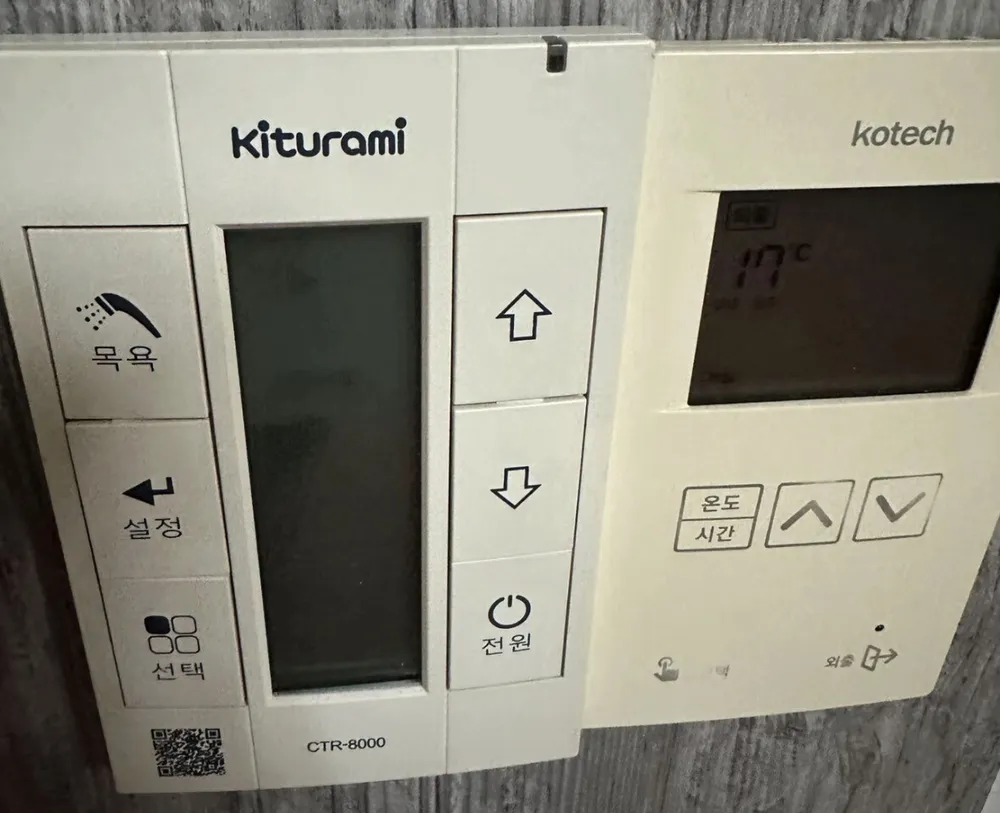
A tall Kiturami controller with three icon buttons on the left (목욕, 설정, 선택), arrows and power on the right, and a narrow screen in the middle.
À quoi sert chaque bouton ?
1Bath · 목욕mogyokExtra hot water for a bath; returns to the previous mode after 2 h 30 min.
2Set (water temps) · 설정seoljeongPress once: radiator water temp bar flashes. In bath mode: sets bath water temp (41–85°C). Change with the arrows.
3Select mode · 선택seontaekEach press: 실내 (room) → 예약 (timer) → 외출 (away) → 실내. Also confirms a setting.
4Screen · 표시창pyosichangWanted temp, current temp, timer, water-temp bar and mode icons. Backlight switches off after ~10 s (blank screen in this photo is normal).
5Running light · 운전표시unjeon pyosiSmall light at the top: on when the boiler is allowed to run.
6Up · 올림ollimRaises the wanted temp / flashing value. In 예약 mode it opens one of the timer values.
7Down · 내림naerimLowers the value. In 예약 mode it opens the other timer value.
8Power · 전원jeonwonTurns the controller and boiler off/on.
Quel réglage choisir ?
Winter: 실내 at 21–22°C, water bar at 4–5 blocks (초겨울 80°C / 겨울 85°C). Away: 외출.
Comment… ?
Allumer
1Press 전원 (bottom right). Touch any button to wake the screen backlight.
Chauffer la pièce à une température
1Press 선택 until the screen shows 실내.
2Press ▲/▼ to set the wanted temp to 22.
3Press 선택 or wait — it saves automatically.
Partir quelques jours
1Press 선택 until 외출 shows.
2Keep power on. In deep cold set 실내 to 10–15°C instead (manual advice).
Programmer
1Press 선택 until 예약 shows.
2Press ▲: one timer value flashes — set with ▲/▼.
3Press ▼: the other value flashes — set with ▲/▼.
4The pair is run-minutes + rest-hours. Manual example: 20 min on, 2 h off, repeating.
5Press 선택 or wait to save.
Eau chaude seule (été)
1No dedicated hot-water-only mode in the manual.
2Use 외출 in summer — heating only runs to prevent freezing (taps still give hot water on Kiturami boilers — see notes).
Régler l'eau chaude
1Press 목욕, then press 설정: bath temp flashes.
2Set with ▲/▼ (41–85°C). Press 선택 or wait to save.
Éteindre
1Press 전원. In winter use 외출 instead.
Que signifient les mots à l'écran ?
실내 (sun icon)
Room mode
Heats to the wanted room temp.
예약 (clock icon)
Timer
Runs minutes / rests hours, repeating.
외출 (suitcase icon)
Away
Frost protection only.
목욕 (shower icon)
Bath
Extra hot water, 2 h 30 min.
희망온도 / 현재온도
Wanted / current temp
Top number = wanted; middle = current room temp.
bar of 1–5 blocks
Radiator water temp
1 = 여름 50°C … 5 = 겨울 85°C.
1588-9000
Service
Shown with error codes.
Les pièges de ce modèle
The screen goes dark after about 10 s — press a button to wake it before reading.
This flat uses several controllers on one wall (photo 29 also has a separate Kotech room thermostat on the right). The Kiturami one runs the boiler; the other controls a room/zone. Changing only one may not heat the room you are in.
In 예약 mode the ▲ and ▼ arrows open the two timer values instead of changing room temp.
Un code erreur s'affiche ?
Errors flash on the screen as 'Er' plus a number, and the screen may also show 'A/S 문의는 1588-9000'. From the older Kiturami (CTR-5700PLUS) manual: Er 01 = burner did not light, Er 03 = flame went out (check the gas valve is open), Er 95 = low water (refill/pressure), Er 96 = overheat, Er 97 = gas leak detected (open windows, do not use switches, call). Press 전원 (power) off/on to restart — it only allows 3 restarts in a row, then wait 5 minutes. If it comes back, call 1588-9000.