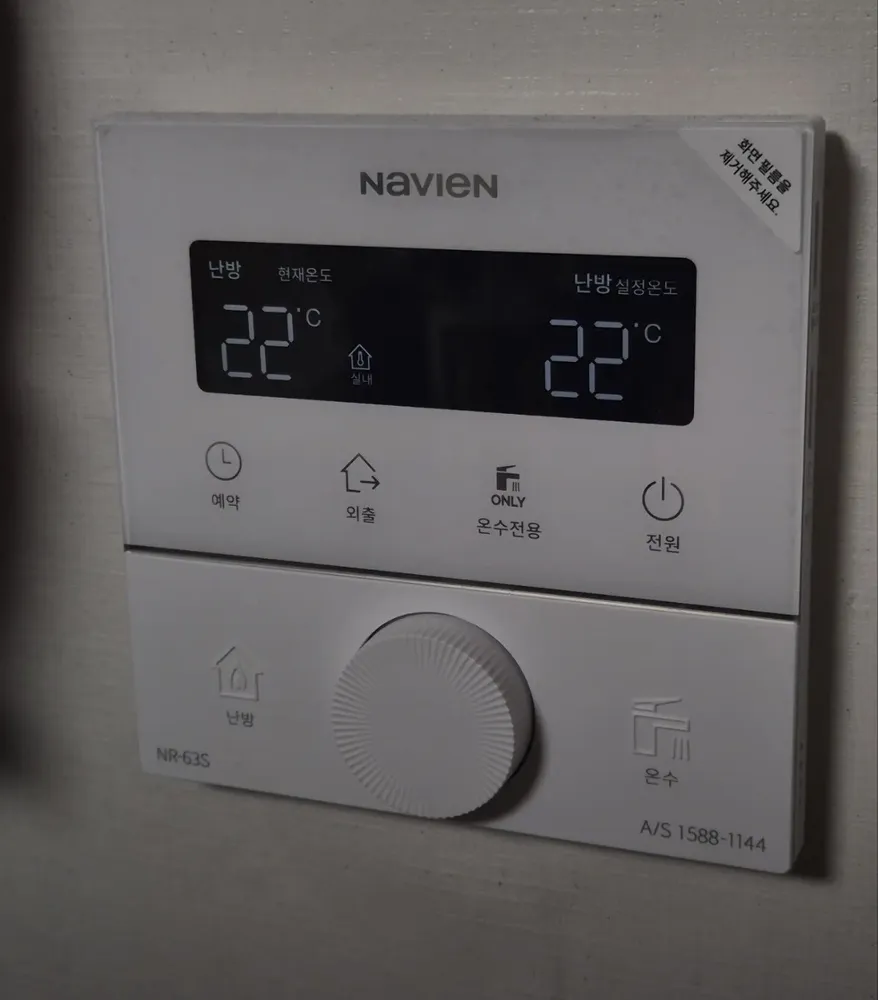
What does each button do?
1Current room temperature · 난방 현재온도nanbang hyeonjae ondoThe room temperature now (22°C here).
2Room-air mode on · 실내silnaeShows that room-air heating is selected (온돌 shows in floor mode).
3Heating set temperature · 난방 설정온도nanbang seoljeong ondoThe temperature you set (22°C here).
4Timer · 예약yeyakSet 'every __ hours, run __ minutes'.
5Away · 외출oechulStops heating; hot water and frost protection keep working. Press again to cancel.
6Hot water only · 온수전용 (ONLY)onsu jeonyongNo heating. Works the same as 외출. Press 난방 to undo.
7Power · 전원jeonwonOn / off. Off stops heating and hot water.
8Heating · 난방nanbangPress to heat. Hold about 1 s to switch between 실내 (room air) and 온돌 (floor).
9Dial · 다이얼daieolTurn it to set the value. It saves by itself after a moment.
10Hot water · 온수onsuPress, then turn the dial for 30–60°C. Hold 3 s for quick hot water (10 min).
What setting should I use?
실내 at 21–23°C, hot water 45°C.
How do I…?
Turn it on
- 1Press 전원. The screen lights up.
Heat the room to a set temperature
- 1Press 난방. If 온돌 shows, hold 난방 about 1 s until 실내 shows.
- 2Turn the dial to 22. It saves by itself.
Use floor (ondol) mode
- 1Hold 난방 about 1 s until 온돌 shows.
- 2Turn the dial to about 50 (range 30–65°C).
Leave for a few days
- 1Press 외출. 외출 appears.
- 2Press 외출 again to cancel.
Run on a timer
- 1Press 예약. The screen shows '00시간마다 00분 가동'.
- 2While the hours blink, turn the dial to set every how many hours (1–12).
- 3Press 예약.
- 4While the minutes blink, turn the dial for run time (10–50, in 10-min steps), then press 예약 to finish.
Hot water only (summer)
- 1Press 온수전용. 전용 appears.
- 2To heat again, press 난방.
Change the hot-water temperature
- 1Press 온수. The hot-water value blinks.
- 2Turn the dial to 45. It saves by itself.
Turn it off
- 1Press 전원.
- 2In winter use 외출 instead, so the pipes stay protected.
What do the words on the screen mean?
| 현재온도 | Current temperature | Room temperature now. |
|---|
| 설정온도 | Set temperature | The target you chose. |
|---|
| 실내 / 온돌 | Room / Floor | Active heating mode. |
|---|
| 불꽃 | Flame icon | The boiler is heating now. |
|---|
| 나뭇잎 | Leaf icon | Gas-saving indicator. Nothing to do. |
|---|
| 00시간마다 00분 가동 | Every __ h, run __ min | Timer setting. |
|---|
| 빠른 | Quick | Quick hot water is on (ends after 10 min). |
|---|
| 전용 | Only | Hot-water-only mode. |
|---|
| 외출 | Away | Heating off; hot water and frost protection only. |
|---|
What trips people up on this model?
- Peel off the protective film on the screen (the corner sticker in the photo says so).
- 외출 and 온수전용 do the same thing: no heating, hot water and frost protection only.
- Quick hot water needs a 3 s hold here, longer than on older Navien models.
It shows an error. Now what?
Note any code on the screen and call 1588-1144.
Service line (Korean): 1588-1144
Read the full Korean heating guide →
Sources