Navien NR-15S in English

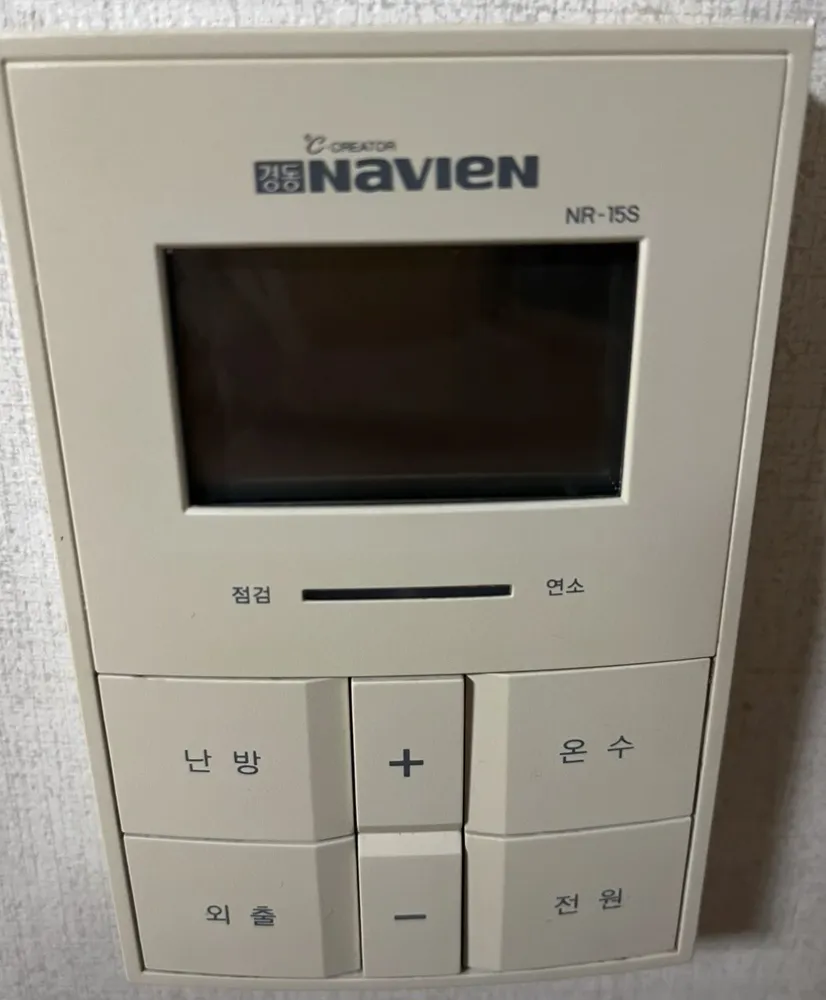
A six-button Navien controller with an LCD: press 난방 to cycle modes and use + / − to set the number.
What does each button do?

Navien NR-15S boiler control panel in a Seoul home
  1. 1Display · 표시창pyosichangShows the mode (실내/온돌/예약/외출) and the temperature or timer number.
  2. 2Check / fault · 점검jeomgeomThis end of the light bar shows a fault.
  3. 3Burning · 연소yeonsoThis end lights when the burner is firing.
  4. 4Heating / mode · 난방nanbangEach press moves to the next heating mode: 실내 (room air), 온돌 (floor), 예약 (timer).
  5. 5Up · +peulleoseuRaises the blinking setting.
  6. 6Hot water · 온수onsuPress, then use + / − to set hot water 30–60°C. Hold 2 s for quick hot water (빠른온수, ends after 10 min).
  7. 7Away / hot water only · 외출oechulStops heating; hot water and frost protection keep working. Press again to return to the previous setting.
  8. 8Down · −maineoseuLowers the blinking setting.
  9. 9Power · 전원jeonwonTurns the controller on or off.

What setting should I use?

실내 at 21–23°C; hot water 45°C. For trips, 외출.

How do I…?

Turn it on

  1. 1Press 전원. The display lights up.

Heat the room to a set temperature

  1. 1Press 난방 until 실내 blinks on the display.
  2. 2While it blinks, press + or − to reach 22.
  3. 3Leave it. It saves by itself.

Use floor (ondol) mode

  1. 1Press 난방 until 온돌 blinks.
  2. 2Press + / − to set the floor-water temperature. Start around 50°C.

Leave for a few days

  1. 1Press 외출. 외출 appears on the display.
  2. 2To come back, press 외출 again. The previous setting returns.

Run on a timer

  1. 1Press 난방 until 예약 blinks.
  2. 2Press + / − to set the pause in hours between heating runs (0–12).
  3. 3The run length is fixed by the boiler.

Hot water only (summer)

  1. 1Press 외출. On this model, Away and hot-water-only are the same mode.
  2. 2To heat again, press 난방.

Change the hot-water temperature

  1. 1Press 온수. 온수온도 blinks.
  2. 2Press + / − to set 30–60°C. Around 45°C is comfortable for showers.
  3. 3On some boilers it uses steps instead: press 온수 again for 저 → 중 → 고.

Turn it off

  1. 1Press 전원.
  2. 2In winter use 외출 instead, so the pipes stay protected.

What do the words on the screen mean?

실내Room-air modeHeats to a room air temperature (10–40°C).
온돌Floor modeHeats the floor water to a set temperature (30–60°C or 40–80°C, depending on the boiler).
예약TimerThe number is the hours of pause between heating runs (0–12).
외출AwayHeating is off; hot water and frost protection stay on.
현재온도 / 희망온도Current / target temperatureRoom temperature now, and the temperature you set.
온수온도Hot-water temperatureBlinks while you set hot water.
빠른온수Quick hot waterPre-heating for faster hot water; ends by itself after 10 min.
온수예열Hot-water pre-heatKeeps water warm in winter (only on some condensing boilers). Hold 온수 for 2 s to switch on or off.
연소 / 점검Burning / CheckLight bar under the screen: burning = boiler firing, check = fault.

What trips people up on this model?

  • There is no separate 온수전용 button: 외출 is hot-water-only.
  • Holding 온수 for 2 s toggles quick hot water or pre-heat. A short press only changes the temperature.
  • Set hot water above 50°C only with all taps closed, as the manual says.

It shows an error. Now what?

A fault lights the 점검 end of the light bar. Note any code on the display and call 1588-1144.

Service line (Korean): 1588-1144

Other Navien panels

Read the full Korean heating guide →

Can't find your panel?

Send one photo. We reply with your panel in English.

By sending, you agree to our Privacy Policy.

Sources