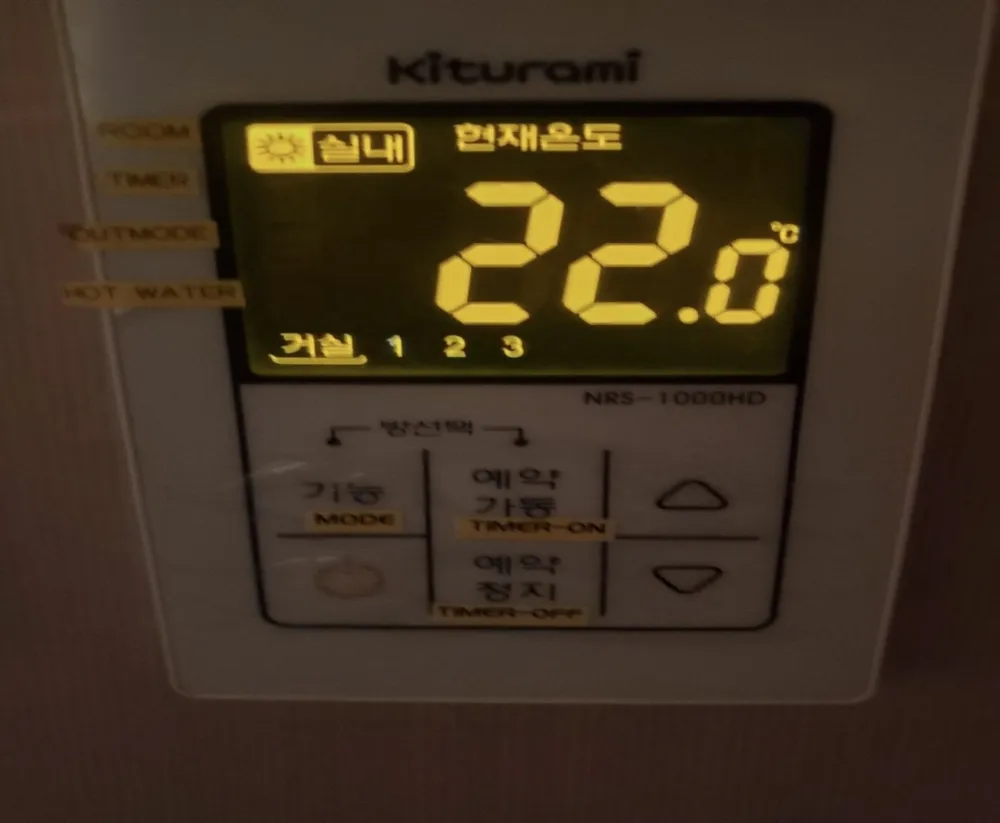
A Kiturami room-by-room (각방) controller: one screen shows the living room (거실) and rooms 1–3, with buttons for mode, timer on/off, up/down and power.
We could not find this exact model's manual, so these steps come from its closest sibling. If your panel behaves differently, send us a photo.
What does each button do?
1Mode stickers · ROOM / TIMER / OUTMODE / HOT WATER(English stickers)Hand-added English labels for the modes the 기능 button cycles through: room, timer, away, hot water/bath.
2Room mode (shown) · 실내silnaeCurrent mode of the selected room. Sun icon + 실내 = heating to a set temperature.
3Current temp · 현재온도hyeonjae ondoTemperature in the selected room (22.0°C here).
4Rooms · 거실 1 2 3geosil il i sam거실 = living room, 1/2/3 = bedrooms. The underlined one is the room you are viewing/changing.
5Room select · 방선택bang seontaekPrinted over 기능 and 예약가동 — likely press both together to step to the next room (unverified).
6Mode · 기능 (MODE)gineungCycles the mode for the selected room: 실내 (room) → 예약 (timer) → 외출 (away) → 목욕/온수 (hot water/bath).
7Timer: run time · 예약가동 (TIMER-ON)yeyak gadongIn 예약 mode, sets how many minutes the heating RUNS each cycle.
8Up · ▲ollimRaises the wanted temp or the value being set.
9Power · 전원jeonwonOn/off for the controller.
10Timer: rest time · 예약정지 (TIMER-OFF)yeyak jeongjiIn 예약 mode, sets how many hours the heating RESTS between runs.
11Down · ▼naerimLowers the wanted temp or the value being set.
What setting should I use?
Your room: 실내 at 21–22°C. Empty rooms: 외출. Avoid 예약 unless you know the numbers (about 20 min on / 2 h off).
How do I…?
Turn it on
1Press the power button (bottom-left, ⏻ symbol).
Heat the room to a set temperature
1Check which room is underlined (거실, 1, 2 or 3). Change room with 방선택 (likely 기능 + 예약가동 together — unverified).
2Press 기능 (MODE) until 실내 shows.
3Press ▲/▼ to set 22°C. Wait about 10 s and it saves.
Leave for a few days
1Press 기능 until 외출 shows. Rooms are only kept from freezing.
2Unused rooms can stay in 외출 while you heat your own room.
Run on a timer
1Press 기능 until 예약 shows.
2Press 예약가동 (TIMER-ON) and set the run minutes with ▲/▼ (sister model: 5–60 min, default 20).
3Press 예약정지 (TIMER-OFF) and set the rest hours with ▲/▼ (sister model: default 2 h).
4Wait ~10 s to save.
Hot water only (summer)
1Set every room to 외출 with 기능. Hot water keeps working from the boiler (unverified on this model).
Turn it off
1Press power. In winter, prefer 외출 so pipes in each room stay safe.
What do the words on the screen mean?
실내 (sun icon)
Room mode
Heats the selected room to its set temp.
예약
Timer
Runs X minutes, rests Y hours.
외출
Away
Frost protection only (sister model: heats only below ~7°C).
목욕
Bath / hot water
Hot-water priority; sister model returns after 2 h 30 min.
현재온도 22.0℃
Current temp
Selected room's temperature.
거실 / 1 / 2 / 3
Rooms
Underlined = room currently shown.
What trips people up on this model?
Each room has its own mode and temperature — make sure the room you are standing in is the one underlined before changing anything.
The 22.0 on screen is the CURRENT temp of the selected room, not necessarily your room.
This is a zone controller: the boiler itself may also have its own Kiturami controller elsewhere.
It shows an error. Now what?
No model-specific codes found. Power off/on once; if it repeats, call Kiturami 1588-9000.
Service line (Korean): 1588-9000 (not visible in photo; Kiturami national A/S)