Navien NR-30S explicado

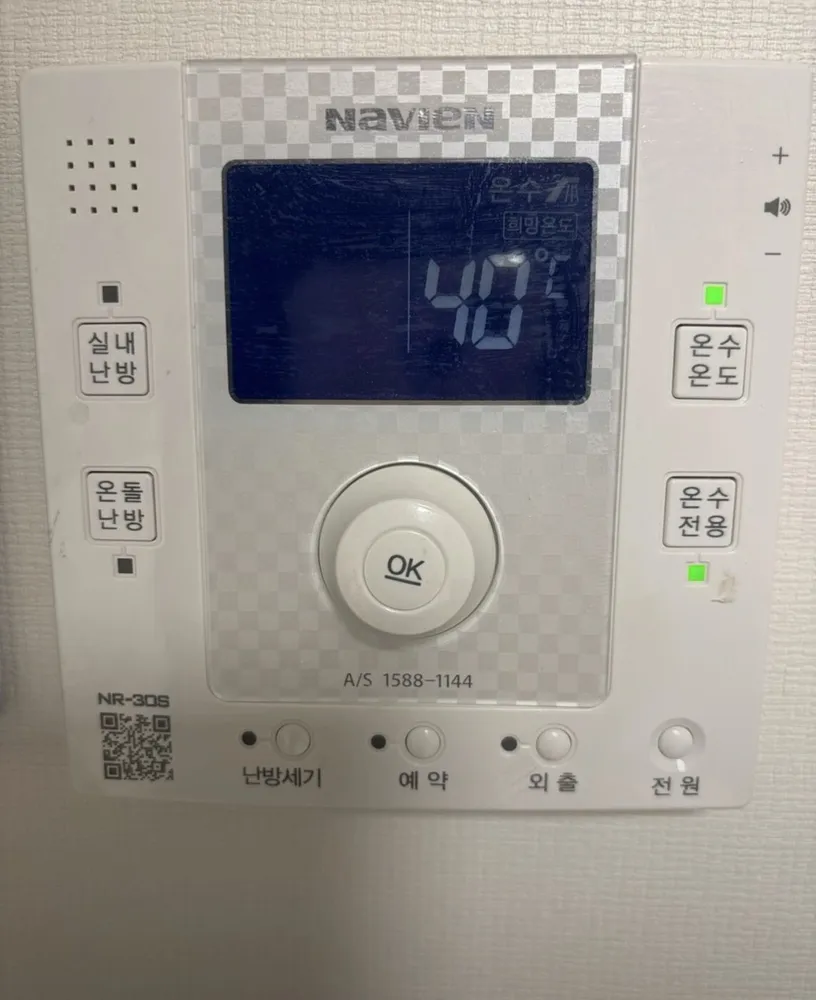
A talking Navien controller with a blue screen, a dial with an OK button, and labelled buttons on both sides and along the bottom.
¿Qué hace cada botón?

Panel de caldera Navien NR-30S en una vivienda de Seúl
  1. 1Speaker · 스피커seupikeoThis model speaks instructions out loud.
  2. 2Voice volume · 음성볼륨 (+ / −)eumseong bollyumSide wheel: turn it to change the voice volume. Turn it fully down to mute.
  3. 3Display · 표시창pyosichangShows the mode and the temperature being set (온수 희망온도 40°C here).
  4. 4Room-air heating · 실내난방silnae nanbangPress, then turn the dial to 10–40°C. The light above shows it is on.
  5. 5Floor heating · 온돌난방ondol nanbangPress, then turn the dial to 40–83°C floor-water temperature.
  6. 6Hot-water temperature · 온수온도onsu ondoPress, then turn the dial to 30–60°C. Hold 2 s for quick hot water (10 min).
  7. 7Hot water only · 온수전용onsu jeonyongNo heating. Choose a heating mode to undo. The green light below shows it is on.
  8. 8Dial · 다이얼daieolTurn it to change the blinking value.
  9. 9OK / confirm · OKOKConfirms a step, mainly in the timer setup.
  10. 10Heating power · 난방세기nanbang segiPress, then turn the dial to 약 / 중 / 강 (low / medium / high output).
  11. 11Timer · 예약yeyakSet 'every __ hours, run __ minutes'.
  12. 12Away · 외출oechulStops heating; hot water and frost protection keep working. Press again to cancel.
  13. 13Power · 전원jeonwonOn / off.

¿Qué ajuste uso?

실내난방 at 21–23°C, 난방세기 중, hot water 45°C.

¿Cómo…?

Encender

  1. 1Press 전원 (bottom right).

Calentar la habitación a una temperatura

  1. 1Press 실내난방 (left, top).
  2. 2Turn the dial to 22.

Modo suelo (ondol)

  1. 1Press 온돌난방 (left, lower).
  2. 2Turn the dial to about 55 (range 40–83°C).

Salir unos días

  1. 1Press 외출 (bottom). Its lamp turns on.
  2. 2Press 외출 again to return to the previous setting.

Programar

  1. 1Press 예약 (bottom). The screen shows 'OO시간마다 OO분 가동'.
  2. 2Turn the dial to choose every how many hours (1–12).
  3. 3Press OK in the centre of the dial.
  4. 4Turn the dial to choose run minutes (10–50), then press OK. Example: every 3 h, run 20 min.

Solo agua caliente (verano)

  1. 1Press 온수전용 (right, lower).
  2. 2To heat again, press 실내난방 or 온돌난방.

Ajustar el agua caliente

  1. 1Press 온수온도 (right, top).
  2. 2Turn the dial to 45.

Apagar

  1. 1Press 전원.
  2. 2In winter use 외출 instead, so the pipes stay protected.

¿Qué significan las palabras de la pantalla?

희망온도Target temperatureThe value you are setting.
온수Hot waterThe number shown is hot-water temperature.
OO시간마다 OO분 가동Every __ h, run __ minTimer setting.
빠른온수Quick hot waterQuick hot water is on; it ends after 10 min.
약 / 중 / 강Low / Medium / HighHeating power level.
버튼 옆 녹색 램프Green button lightsShow which mode or function is on (온수전용 in this photo).

Trampas de este modelo

  • In photo 66 the green light is on 온수전용, so the heating is off. Press 실내난방 to heat.
  • OK is only needed for the timer. Other settings take effect as you turn the dial.
  • If the voice is annoying, turn the side wheel all the way down.

¿Sale un código de error?

Note any code on the screen and call 1588-1144.

Servicio técnico (coreano): 1588-1144

Otros paneles Navien

Lee la guía completa de calefacción en Corea →

¿No encuentras tu panel?

Envía una foto. Te lo explicamos en inglés.

Al enviar, aceptas nuestra política de privacidad.

Fuentes