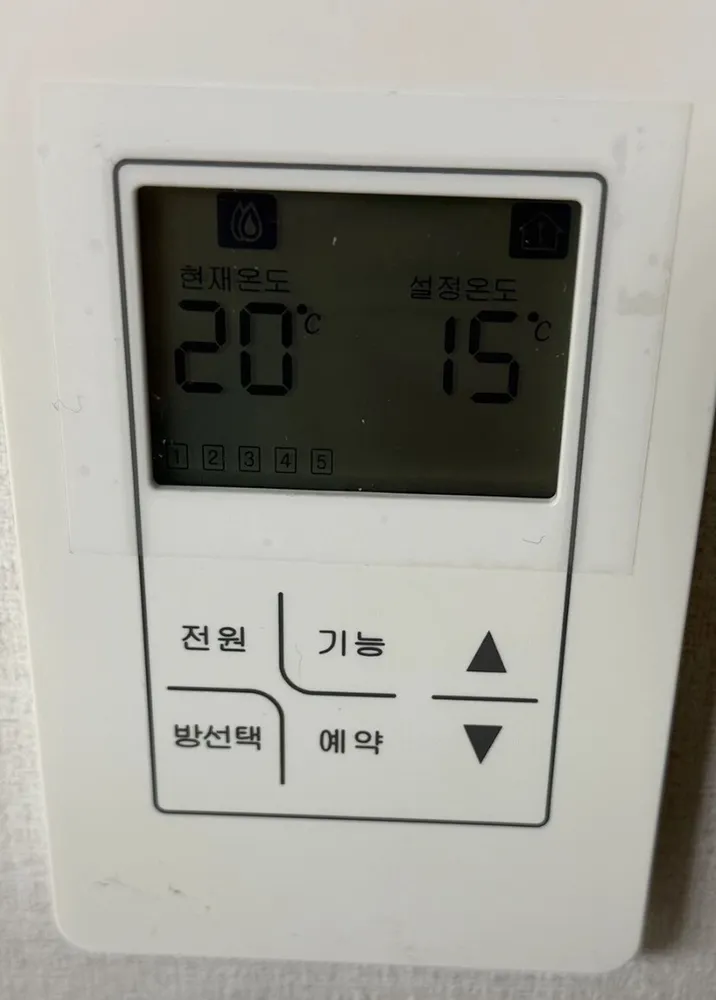
Unbranded 5-room zone controller (전원/기능/방선택/예약) in English
A living-room master thermostat for a 5-room zoned floor-heating system: it shows current vs set temperature and can switch between rooms 1-5.
We could not find this exact model's manual, so these steps come from its closest sibling. If your panel behaves differently, send us a photo.
What does each button do?
1Flame icon · Heating mode indicator for the selected room.
2House icon · Probably the Away/home-mode indicator. Not verified.
3Current temperature · 현재온도hyeonjae ondoRoom temperature now (20°C).
4Set temperature · 설정온도seoljeong ondoTarget (15°C). Because 20 > 15, this room is not calling for heat.
5Room numbers · 1 2 3 4 5The rooms on this system. The selected room is highlighted.
6Power · 전원jeonwonTurns heating on or off for the selected room.
7Function · 기능gineungCycles through modes (likely Away / timer / temperature). Not verified.
8Up · ▲Raises the set temperature or value.
9Room select · 방선택bangseontaekSteps through rooms 1-5 so you can set each room from here.
10Reservation / timer · 예약yeyakDelayed or cycle heating. The scheme is not verified for this model.
11Down · ▼Lowers the set temperature or value.
What setting should I use?
20-21°C in rooms you use, 15-17°C in empty rooms. Change one room at a time with 방선택.
How do I…?
Turn it on
- 1Press 전원 once. The screen and flame icon appear.
Heat the room to a set temperature
- 1Press ▲ until 설정온도 reads 21.
- 2Wait a few seconds for it to save.
- 3Heating runs while 현재온도 is below 설정온도.
Leave for a few days
- 1Easiest safe method: lower 설정온도 to about 10°C with ▼.
- 2Or press 기능 until an Away/외출 mark shows (not verified).
Turn it off
- 1Press 전원 again, or set 설정온도 below the current temperature.
What do the words on the screen mean?
| 현재온도 | Current temp | Measured room temperature. |
|---|
| 설정온도 | Set temp | Target. Heat flows only while current is below set. |
|---|
| 1-5 | Rooms | Zones on the system; the highlighted one is the room you are editing. |
|---|
What trips people up on this model?
- 15°C set with 20°C current means no heat at all. Raise the set number above the room temperature.
- Room select changes which room you are editing. Check the highlighted number before pressing ▲/▼.
Service line (Korean): Not printed on panel.
Read the full Korean heating guide →
Sources