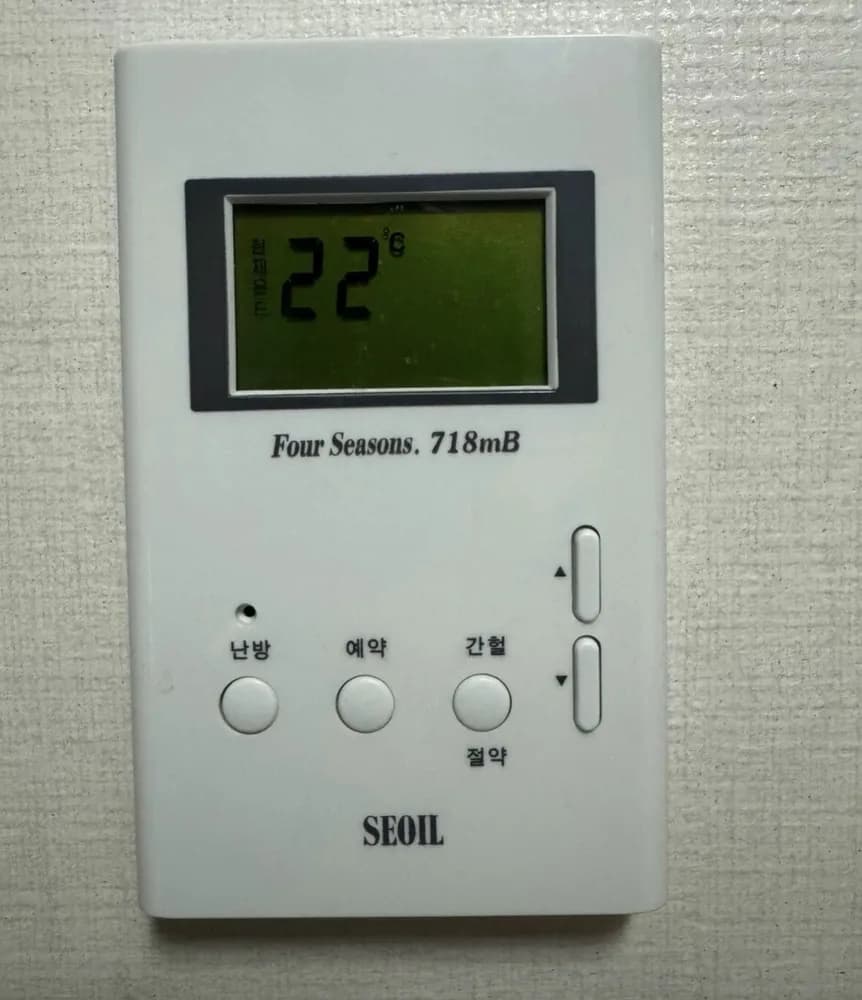
SEOIL Four Seasons 718mB in English
A simple room thermostat with three keys (heat, reservation, intermittent-saving) and ▲▼ for the temperature.
We could not find this exact model's manual, so these steps come from its closest sibling. If your panel behaves differently, send us a photo.
What does each button do?
1Current temperature label · 현재온도hyeonjae ondoPrinted vertically beside the big number: the number is the room temperature now.
2Temperature display · Room temperature (22°C). Shows the set value while you adjust.
3Up · ▲Raise the set temperature or value.
4Small hole · Likely a status lamp or sensor opening. Not verified.
5Down · ▼Lower the set temperature or value.
6Heat · 난방nanbangHeating on/off (temperature mode).
7Reservation · 예약yeyakTimed heating. The scheme is not verified for this model.
8Intermittent / Saving · 간헐 / 절약ganheol / jeoryakRuns heat in short bursts on a cycle to save fuel. Not verified.
What setting should I use?
난방 mode at 20-22°C while home; lower the target rather than switching off in freezing weather.
How do I…?
Turn it on
- 1Press 난방 once.
Heat the room to a set temperature
- 1Press ▲ or ▼; the display switches to the set temperature.
- 2Set 21-22.
- 3Wait a few seconds; it returns to the room temperature.
Leave for a few days
- 1Press 간헐/절약 (intermittent saving) or lower the set temperature to about 10°C (unverified which this model prefers).
Turn it off
- 1Press 난방 again.
What do the words on the screen mean?
| 현재온도 | Current temperature | Measured room temperature. |
|---|
What trips people up on this model?
- 예약 and 간헐/절약 schemes are not documented online for this model. If heating behaves oddly, press 난방 and set the temperature directly.
Service line (Korean): Not printed on panel.
Read the full Korean heating guide →
Sources