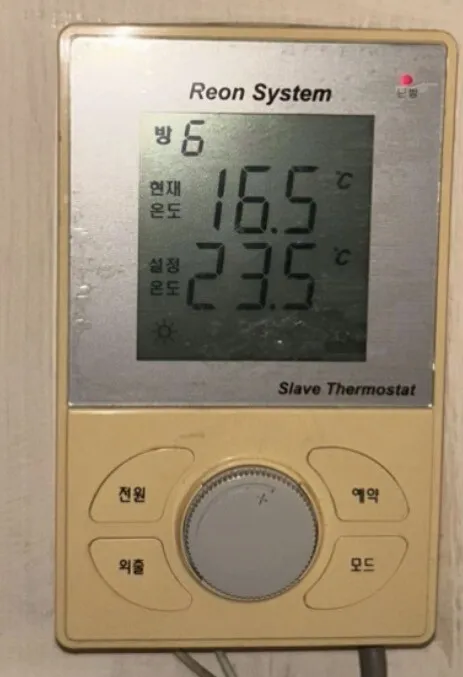
A bedroom (slave) thermostat from a Reon multi-room floor-heating system: it shows room number, current and set temperature, and you turn the dial to change the target.
We could not find this exact model's manual, so these steps come from its closest sibling. If your panel behaves differently, send us a photo.
What does each button do?
1Heating lamp · 난방nanbangRed lamp: lit when this room is calling for heat.
2Room number · 방 6bang 6This unit controls room 6 of the system.
3Current temperature · 현재온도hyeonjae ondoRoom temperature now (16.5°C).
4Set temperature · 설정온도seoljeong ondoTarget (23.5°C).
5Mode icon · ☀Probably normal/day mode. Not verified.
6Power · 전원jeonwonHeating on/off for this room.
7Dial · Turn to change the set temperature.
8Reservation · 예약yeyakTimed heating. Not verified for this model.
9Away · 외출oechulLow-temperature hold while you are away.
10Mode · 모드modeuSwitches the control mode (e.g. temperature vs timer). Not verified.
What setting should I use?
20-22°C in temperature mode; 외출 when out for the day.
How do I…?
Turn it on
1Press 전원.
Heat the room to a set temperature
1Turn the dial until 설정온도 reads 22.0.
2The red 난방 lamp lights while the room is below target.
Leave for a few days
1Press 외출. Press again when back.
Turn it off
1Press 전원 again.
What do the words on the screen mean?
방
Room
Room number this thermostat controls.
현재 온도
Current temp
Measured room temperature.
설정 온도
Set temp
Target temperature.
What trips people up on this model?
Reon is a smaller brand and some older Reon systems are hard to get serviced. If the actuator under the sink keeps cycling, the room may heat poorly.
If the living-room master unit is dead, bedroom units may not work either.
It shows an error. Now what?
Installers report a 'C4' error on Reon thermostats; its meaning is not documented online.