Navien NR-15S 英文说明

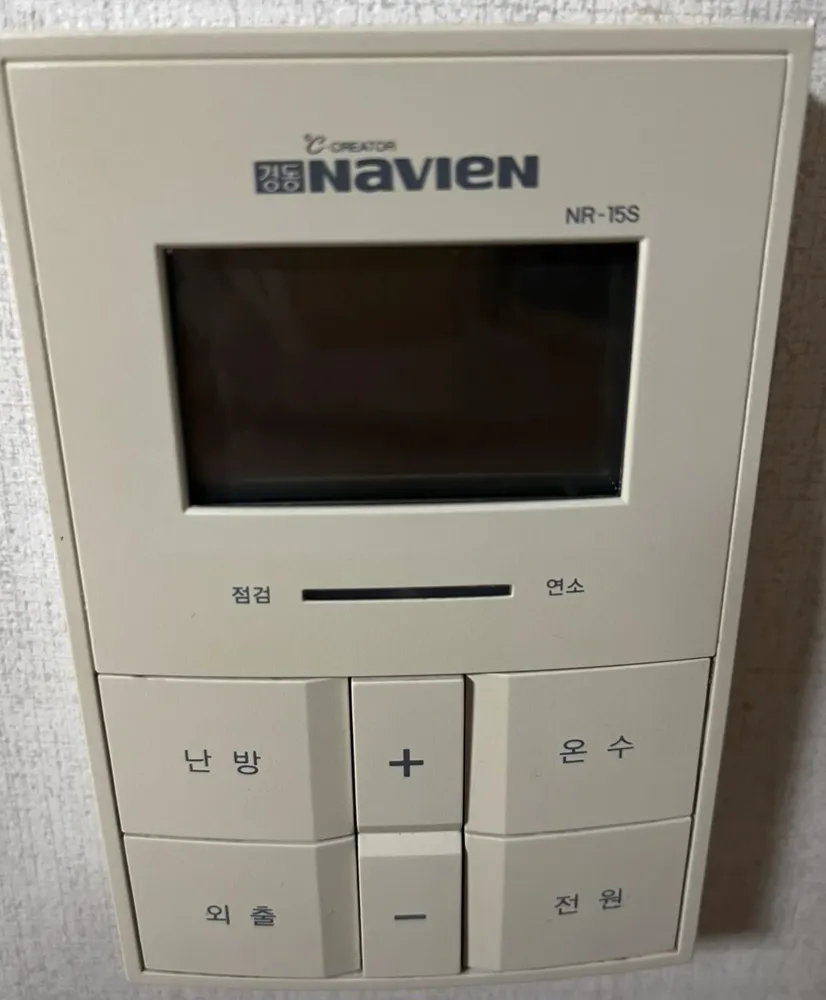
A six-button Navien controller with an LCD: press 난방 to cycle modes and use + / − to set the number.
每个按钮是做什么的?

首尔住宅里的 Navien NR-15S 锅炉控制面板
  1. 1Display · 표시창pyosichangShows the mode (실내/온돌/예약/외출) and the temperature or timer number.
  2. 2Check / fault · 점검jeomgeomThis end of the light bar shows a fault.
  3. 3Burning · 연소yeonsoThis end lights when the burner is firing.
  4. 4Heating / mode · 난방nanbangEach press moves to the next heating mode: 실내 (room air), 온돌 (floor), 예약 (timer).
  5. 5Up · +peulleoseuRaises the blinking setting.
  6. 6Hot water · 온수onsuPress, then use + / − to set hot water 30–60°C. Hold 2 s for quick hot water (빠른온수, ends after 10 min).
  7. 7Away / hot water only · 외출oechulStops heating; hot water and frost protection keep working. Press again to return to the previous setting.
  8. 8Down · −maineoseuLowers the blinking setting.
  9. 9Power · 전원jeonwonTurns the controller on or off.

我该用什么设置?

실내 at 21–23°C; hot water 45°C. For trips, 외출.

怎么……?

开机

  1. 1Press 전원. The display lights up.

把房间加热到设定温度

  1. 1Press 난방 until 실내 blinks on the display.
  2. 2While it blinks, press + or − to reach 22.
  3. 3Leave it. It saves by itself.

使用地暖(ondol)模式

  1. 1Press 난방 until 온돌 blinks.
  2. 2Press + / − to set the floor-water temperature. Start around 50°C.

离开几天

  1. 1Press 외출. 외출 appears on the display.
  2. 2To come back, press 외출 again. The previous setting returns.

定时运行

  1. 1Press 난방 until 예약 blinks.
  2. 2Press + / − to set the pause in hours between heating runs (0–12).
  3. 3The run length is fixed by the boiler.

仅热水(夏季)

  1. 1Press 외출. On this model, Away and hot-water-only are the same mode.
  2. 2To heat again, press 난방.

调节热水温度

  1. 1Press 온수. 온수온도 blinks.
  2. 2Press + / − to set 30–60°C. Around 45°C is comfortable for showers.
  3. 3On some boilers it uses steps instead: press 온수 again for 저 → 중 → 고.

关机

  1. 1Press 전원.
  2. 2In winter use 외출 instead, so the pipes stay protected.

屏幕上的字是什么意思?

실내Room-air modeHeats to a room air temperature (10–40°C).
온돌Floor modeHeats the floor water to a set temperature (30–60°C or 40–80°C, depending on the boiler).
예약TimerThe number is the hours of pause between heating runs (0–12).
외출AwayHeating is off; hot water and frost protection stay on.
현재온도 / 희망온도Current / target temperatureRoom temperature now, and the temperature you set.
온수온도Hot-water temperatureBlinks while you set hot water.
빠른온수Quick hot waterPre-heating for faster hot water; ends by itself after 10 min.
온수예열Hot-water pre-heatKeeps water warm in winter (only on some condensing boilers). Hold 온수 for 2 s to switch on or off.
연소 / 점검Burning / CheckLight bar under the screen: burning = boiler firing, check = fault.

这款型号有哪些容易踩的坑?

  • There is no separate 온수전용 button: 외출 is hot-water-only.
  • Holding 온수 for 2 s toggles quick hot water or pre-heat. A short press only changes the temperature.
  • Set hot water above 50°C only with all taps closed, as the manual says.

显示错误了。怎么办?

A fault lights the 점검 end of the light bar. Note any code on the display and call 1588-1144.

客服电话(韩语):1588-1144

其他 Navien 面板

阅读完整的韩国供暖指南 →

找不到你的面板?

发一张照片给我们。我们会回复你面板的英文说明。

发送即表示你同意我们的隐私政策。

资料来源