Rinnai RBMC-44 explicado

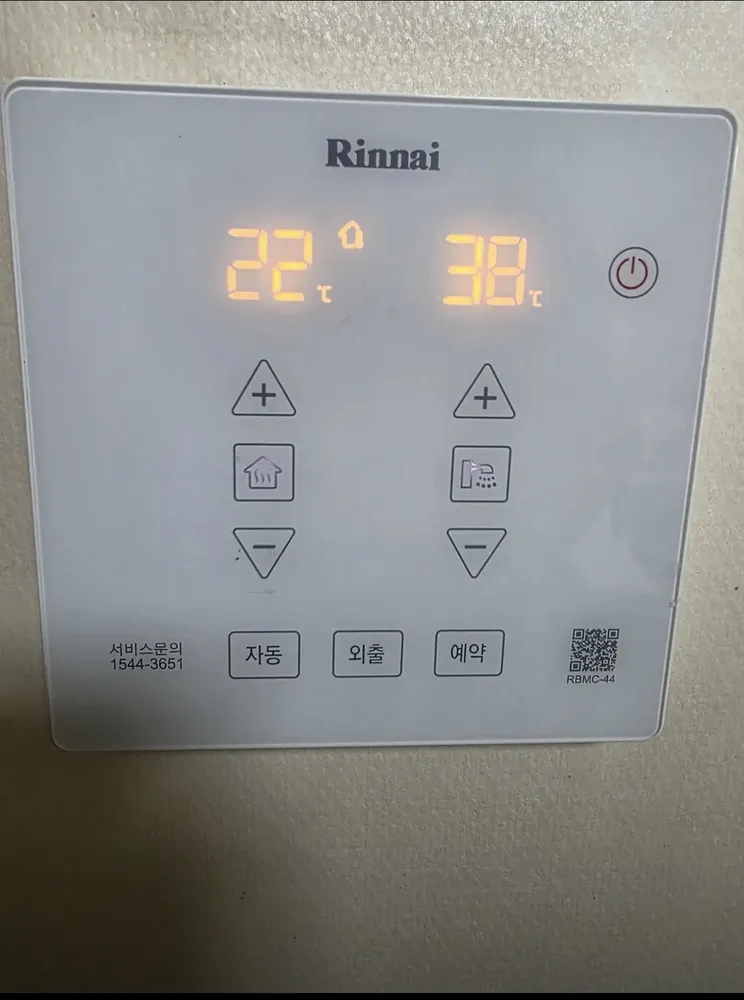
A flat glass touch panel: heating temperature and controls on the left, hot water on the right, and 자동 / 외출 / 예약 touch keys along the bottom.
¿Qué hace cada botón?

Panel de caldera Rinnai RBMC-44 en una vivienda de Seúl
  1. 1Heating temperature · 난방 온도 표시nanbang ondoHeating temperature in °C. House icon = room-air mode; radiator icon = floor mode; flame = burner firing.
  2. 2Room-mode icon · 실내온도 아이콘 (집)sillae ondoHouse symbol shows room-air (실내온도) heating is active.
  3. 3Hot water temperature · 온수 온도 표시onsu ondoThe hot-water temperature setting (°C).
  4. 4Power · 전원 ⏻jeonwonTurns the controller on or off.
  5. 5Heat up · 난방 +nanbangRaise the heating target.
  6. 6Heating on/off · 난방 (집 버튼)nanbangTouch to start or stop heating.
  7. 7Heat down · 난방 −nanbangLower the heating target.
  8. 8Hot water up · 온수 +onsuRaise hot water (35–60°C).
  9. 9Hot water on/off · 온수 (샤워 버튼)onsuTouch to switch hot water on or off.
  10. 10Hot water down · 온수 −onsuLower hot water temperature.
  11. 11Auto · 자동jadongAutomatic mode: adjusts heating to indoor/outdoor temperature by itself. Touch again (or touch heating) to leave it.
  12. 12Away · 외출oechulMinimum heat every 4 hours. Touch 외출 again, or the heating key, to cancel.
  13. 13Timer · 예약yeyakRepeat-heat timer: with heating on, each touch steps the interval (from 30 min upward). Boiler heats 20 min each interval.
  14. 14Service number · 서비스문의 1544-3651seobiseu munuiRinnai A/S.

¿Qué ajuste uso?

Room mode 22°C; hot water 40–45°C. Avoid 자동 if you want predictable bills.

¿Cómo…?

Encender

  1. 1Touch ⏻ (top right). The screen lights.
  2. 2Touch the house key to start heating.

Calentar la habitación a una temperatura

  1. 1Check the house icon shows next to the heating number (room mode).
  2. 2Touch the house key to start heating.
  3. 3Touch + or − on the left until it reads 22.

Modo suelo (ondol)

  1. 1Switch to floor mode with the mode switch (on the matching WF-S100 it's a small slide switch on the right side edge — radiator symbol). The radiator icon appears.
  2. 2Set 55–60 with the left +/−.

Salir unos días

  1. 1Touch 외출. The boiler keeps a minimum heat every 4 hours.
  2. 2Back home: touch 외출 again or the house key.

Programar

  1. 1Turn heating on (house key).
  2. 2Touch 예약; each touch lengthens the interval (30 min upward; on some boilers max 4 h, on others up to 12 h).
  3. 3The boiler heats 20 min once per interval.
  4. 4Touch 예약 until it shows cancel to stop.

Solo agua caliente (verano)

  1. 1Touch the house key so heating is off.
  2. 2Touch the shower key so hot water is on.

Ajustar el agua caliente

  1. 1Use the right +/−. 40–45°C is a comfortable shower.
  2. 2Going above 55°C: close the hot tap first, then press +.

Apagar

  1. 1Touch the house key to stop heating, the shower key to stop hot water, or ⏻ for everything.

¿Qué significan las palabras de la pantalla?

집 아이콘HouseRoom-air mode (실내온도 난방); number = room target/temperature.
라디에이터 아이콘 (|||)Radiator barsFloor-water mode (온돌); number = water temperature.
불꽃 아이콘FlameBurner firing.
온도계 아이콘ThermometerCurrent temperature reading.
오른쪽 숫자Right numberHot water temperature.

Trampas de este modelo

  • Glass touch keys: one firm touch, don't hold — a long touch may trigger something else.
  • Room/floor change is not a front key. Look for a small slide switch on the side edge.
  • Hot water won't go above 55°C while a tap is running (scald safety).

¿Sale un código de error?

If the boiler stops and a number blinks on the screen, read the number. 11 = no ignition: check the gas valve on the pipe is open (handle parallel to the pipe), then switch heating off and on. 14 = overheat cut-out: wait up to 30 min, then switch on again. 16 = water overheating: open at least one floor-zone valve on the manifold and bleed air. Anything repeating: call Rinnai A/S 1544-3651.

Servicio técnico (coreano): 1544-3651

Otros paneles Rinnai

Lee la guía completa de calefacción en Corea →

¿No encuentras tu panel?

Envía una foto. Te lo explicamos en inglés.

Al enviar, aceptas nuestra política de privacidad.

Fuentes