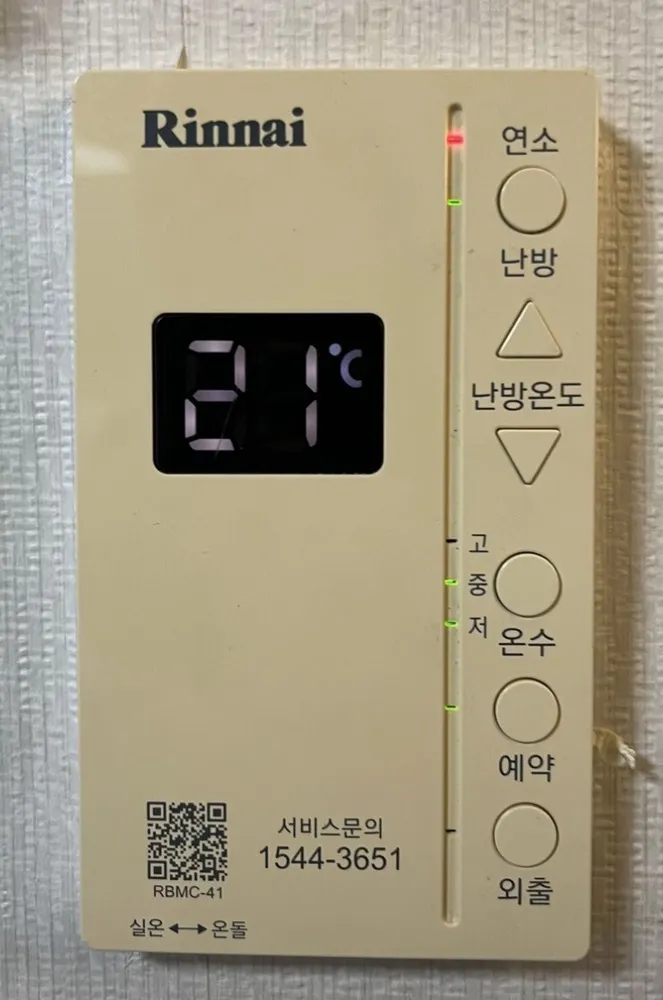
A tall, narrow Rinnai panel: a temperature screen on the left and a column of round buttons on the right (난방, ▲/▼, 온수, 예약, 외출), with room/floor chosen by a tiny slide switch on the bottom edge.
¿Qué hace cada botón?
1Burner lamp · 연소yeonsoRed lamp on the light bar — blinks while the burner fires.
2Heating on/off · 난방nanbangPress to start heating (heating lamp lights). Press again to stop.
3Temperature screen · 온도 표시부ondo pyosibuShows the temperature in °C (room air in 실온 mode, water in 온돌 mode) and blinks error numbers.
4Heat up · 난방온도 ▲nanbang ondoRaise the target. Room mode 5–40°C; floor mode 40–85°C.
5Heat down · 난방온도 ▼nanbang ondoLower the target.
6Hot water lamps · 고 · 중 · 저go · jung · jeoShow the hot-water level. The lit lamp blinks while the hot tap runs.
7Hot water · 온수onsuEach press steps 저 → 중 → 고 → off.
8Timer · 예약yeyakWith heating on, each press: 30 min → 1 h → 2 h → 3 h → 4 h → off. The boiler stops for that time, then heats 20 min, and repeats.
9Away · 외출oechulMinimum heat every 4 hours while you're out. You can't change the temperature while it's on. Press again to cancel.
10Mode slide switch · 실온 ↔ 온돌sil-on ↔ ondolSmall slide switch on the BOTTOM EDGE of the panel. Slide left = room-air mode, right = floor-water mode.
11Service number · 서비스문의 1544-3651seobiseu munuiRinnai A/S.
¿Qué ajuste uso?
Slide switch on 실온, target 22°C; hot water 중.
¿Cómo…?
Encender
1Press 난방 (top button). Its lamp lights.
Calentar la habitación a una temperatura
1Check the slide switch on the bottom edge is on the 실온 side (left).
2Press 난방.
3Press ▲ or ▼ until the screen reads 22.
4Heating only runs while the room is below the target.
Modo suelo (ondol)
1Slide the bottom-edge switch to 온돌 (right).
2Press 난방, then ▲/▼ to about 55–60.
Salir unos días
1Press 외출. Its lamp lights.
2The boiler gives a minimum heat every 4 hours.
3Back home: press 외출 again.
Programar
1Press 난방 to turn heating on.
2Press 예약; each press: 30 min → 1 h → 2 h → 3 h → 4 h → off.
4Cancel: press 예약 (shows the interval), press again to cancel.
Solo agua caliente (verano)
1Press 난방 until its lamp goes off (heating off).
2Press 온수 until 저, 중 or 고 lights.
Ajustar el agua caliente
1Press 온수: 저 → 중 → 고 → off. Use 중.
2Don't step up while the shower runs — sudden hot water.
Apagar
1Press 난방 to stop heating; press 온수 until no level lamp is lit to stop hot water.
¿Qué significan las palabras de la pantalla?
빨간 램프 (연소 옆)
Red lamp
Burner firing (blinks).
난방 램프
Heating lamp
Heating is on.
고/중/저 램프
Hot water level
Hot water on at that level.
예약 램프
Timer lamp
Timer running.
외출 램프
Away lamp
Away mode on.
깜박이는 숫자
Blinking number
Error code.
Trampas de este modelo
The room/floor switch is a hidden slide on the bottom edge — no button for it.
The top button is 난방 (heating). '연소' printed above it is the lamp label, not the button.
One press too many on 온수 turns hot water off.
While 외출 is on, ▲/▼ do nothing.
¿Sale un código de error?
If the boiler stops and a number blinks on the screen, read the number. 11 = no ignition: check the gas valve on the pipe is open (handle parallel to the pipe), then switch heating off and on. 14 = overheat cut-out: wait up to 30 min, then switch on again. 16 = water overheating: open at least one floor-zone valve on the manifold and bleed air. Anything repeating: call Rinnai A/S 1544-3651.