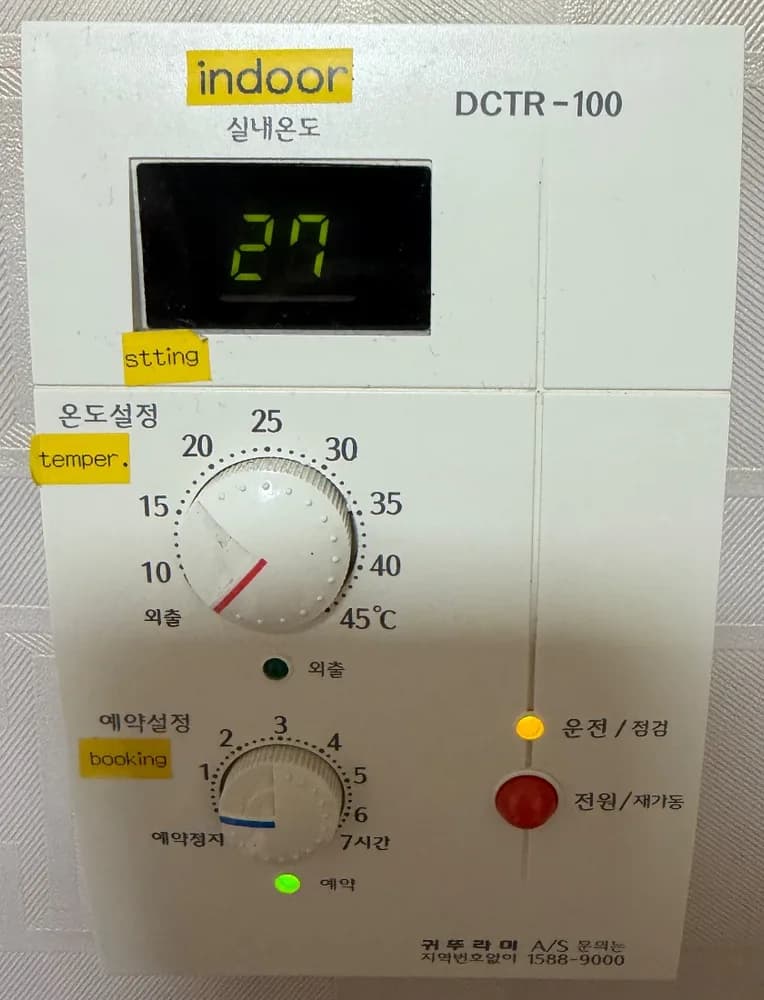
An older Kiturami room controller with a room-temperature screen, a temperature dial (10–45°C, far left = 외출 away), a timer dial (1–7 hours), one power/restart button and three lamps. There is no hot-water control on it.
No encontramos el manual de este modelo exacto; estos pasos vienen del modelo más parecido. Si tu panel funciona distinto, envíanos una foto.
¿Qué hace cada botón?
1Room temperature · 실내온도silnae ondoShows the temperature in the room, in °C.
2Temperature dial · 온도설정ondo seoljeongTurn to the room temperature you want (10–45°C). The line on the knob is the pointer.
3Away (dial end) · 외출oechulTurning the temperature dial all the way left, past 10, selects 외출 (away).
4Away lamp · 외출 램프oechulLit when the panel is in 외출 (away) mode.
5Timer dial · 예약설정yeyak seoljeongSets the timer in hours (1–7). All the way left = 예약정지 (timer off).
6Timer lamp · 예약 램프yeyakLit when the timer is on.
7Running / Check lamp · 운전/점검unjeon/jeomgeomLit while the system is running. 점검 means 'check' — if this lamp behaves differently from normal, call A/S.
8Power / Restart · 전원/재가동jeonwon/jaegadongTurns the controller on or off. 재가동 = restart: pressing it is also how you restart after the boiler stops.
9Service number · A/S 1588-9000A/SKiturami service, no area code needed.
¿Qué ajuste uso?
Timer dial on 예약정지 (green lamp off), temperature dial on 20–22, and leave it on. Use 외출 when away in winter.
¿Cómo…?
Encender
1Press the red 전원/재가동 button. The yellow 운전 lamp lights.
Calentar la habitación a una temperatura
1Turn the 예약설정 (timer) dial all the way left to 예약정지 so the green 예약 lamp goes off.
2Turn the 온도설정 dial so the line points at 20–22.
Salir unos días
1Turn the 온도설정 dial all the way left to 외출. The 외출 lamp lights.
2In winter use this instead of switching off, so pipes do not freeze.
Programar
1Turn the 예약설정 dial to a number of hours (1–7). The green 예약 lamp lights.
2Turn it back to 예약정지 to stop the timer. The exact on/off pattern is not printed on this panel and no manual was found.
Apagar
1Press the red 전원/재가동 button. In freezing weather prefer 외출 instead.
¿Qué significan las palabras de la pantalla?
27 (숫자)
Room temperature
Current temperature in the room, in °C.
운전/점검 (yellow)
Running
System on.
외출 (lamp)
Away
Temperature dial is on 외출.
예약 (green)
Timer on
The 예약설정 dial is set to a number of hours, not 예약정지.
Trampas de este modelo
Check the timer dial first: if the green 예약 lamp is on, the timer is active and the room may not follow the temperature dial the way you expect.
There is no hot-water setting on this panel. Hot water temperature is set on the boiler itself or by the landlord.
No manual for this model is online, so this guide is based on the printed labels only.
¿Sale un código de error?
No error codes are shown on this panel. If the boiler stops, press 전원/재가동 once to restart. If it keeps stopping, call Kiturami 1588-9000.
Servicio técnico (coreano): 1588-9000 (printed on the panel)