开机
- 1Press the power button (bottom-left, ⏻ symbol).
A Kiturami room-by-room (각방) controller: one screen shows the living room (거실) and rooms 1–3, with buttons for mode, timer on/off, up/down and power.
我们没有找到这个型号的确切说明书,因此这些步骤来自与它最接近的型号。如果你的面板表现不同,请发一张照片给我们。
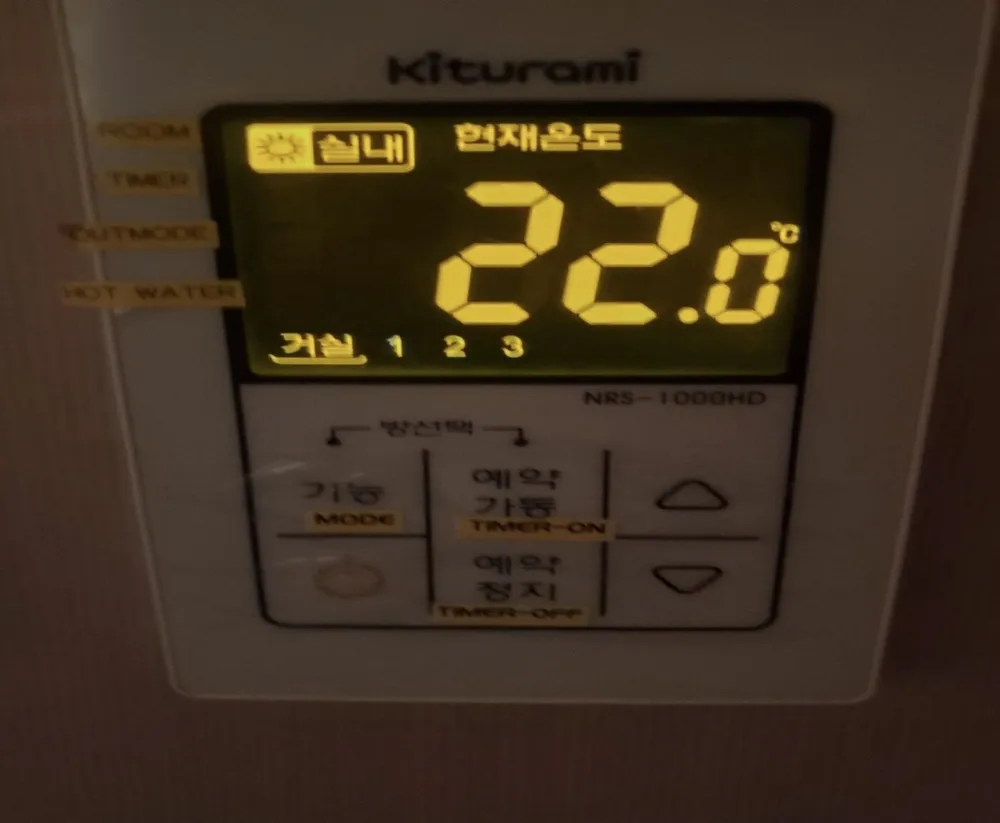
Your room: 실내 at 21–22°C. Empty rooms: 외출. Avoid 예약 unless you know the numbers (about 20 min on / 2 h off).
| 실내 (sun icon) | Room mode | Heats the selected room to its set temp. |
|---|---|---|
| 예약 | Timer | Runs X minutes, rests Y hours. |
| 외출 | Away | Frost protection only (sister model: heats only below ~7°C). |
| 목욕 | Bath / hot water | Hot-water priority; sister model returns after 2 h 30 min. |
| 현재온도 22.0℃ | Current temp | Selected room's temperature. |
| 거실 / 1 / 2 / 3 | Rooms | Underlined = room currently shown. |
No model-specific codes found. Power off/on once; if it repeats, call Kiturami 1588-9000.
客服电话(韩语):1588-9000 (not visible in photo; Kiturami national A/S)