Navien NR-20S expliqué

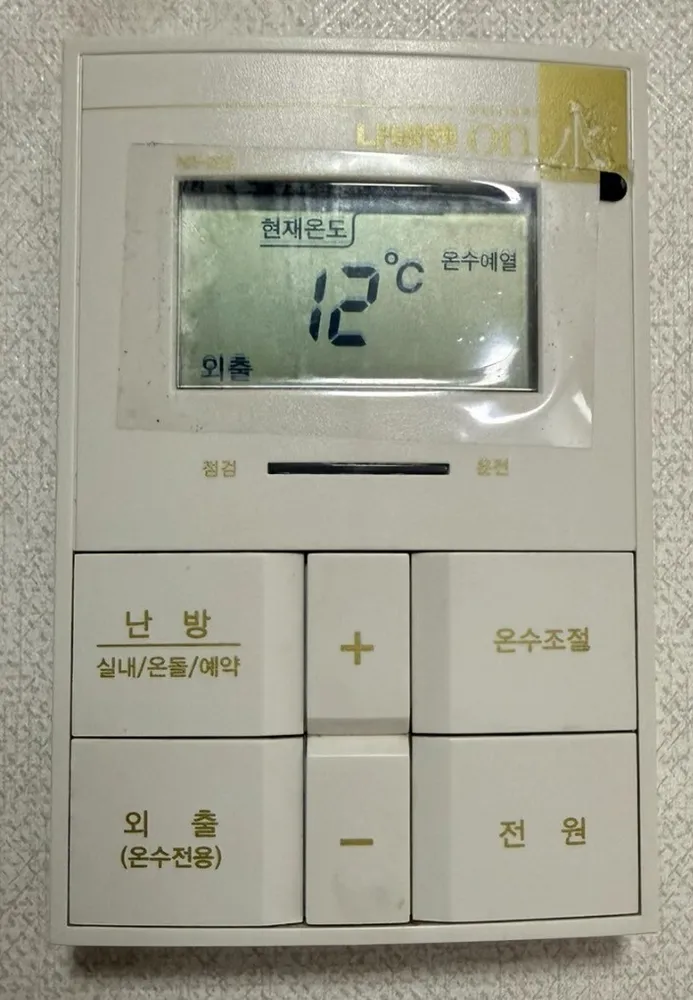
Navien's 'on水' six-button controller: 난방 cycles room / floor / timer, + / − sets the number, and 외출 doubles as hot-water-only.
À quoi sert chaque bouton ?

Panneau de chaudière Navien NR-20S dans un logement à Séoul
  1. 1Model badge · on水on-suBrand badge only. It marks the Navien 'on水' controller line.
  2. 2Current temperature · 현재온도hyeonjae ondoLabel: the big number is the room temperature now.
  3. 3Temperature · 온도 숫자ondoShows the temperature in °C (12°C in this photo).
  4. 4Hot-water pre-heat on · 온수예열onsu yeyeolPre-heat keeps hot water ready in winter. Hold 온수조절 for 2 s to switch it on or off.
  5. 5Away is on · 외출oechulShown when Away / hot-water-only is on. Heating is off.
  6. 6Check / fault · 점검jeomgeomThis end of the light bar shows a fault.
  7. 7Running · 운전unjeonThis end lights when the boiler is running.
  8. 8Heating mode · 난방 (실내/온돌/예약)nanbang (silnae/ondol/yeyak)Each press moves to the next mode: 실내 (room air), 온돌 (floor), 예약 (timer). Also cancels Away.
  9. 9Up · +peulleoseuRaises the blinking setting.
  10. 10Hot-water temperature · 온수조절onsu jojeolPress, then + / − for 30–60°C. Hold 2 s: quick hot water / pre-heat on or off.
  11. 11Away (hot water only) · 외출 (온수전용)oechul (onsu jeonyong)Stops heating; hot water and frost protection keep working. Press again to return to the previous setting.
  12. 12Down · −maineoseuLowers the blinking setting.
  13. 13Power · 전원jeonwonTurns the controller on or off.

Quel réglage choisir ?

실내 at 21–23°C, hot water 45°C, pre-heat left on in winter. 외출 only for trips.

Comment… ?

Allumer

  1. 1Press 전원. The display lights up.

Chauffer la pièce à une température

  1. 1If 외출 shows on the screen, press 난방 first.
  2. 2Press 난방 until 실내 blinks.
  3. 3While it blinks, press + / − to reach 22. It saves by itself.

Mode sol (ondol)

  1. 1Press 난방 until 온돌 blinks.
  2. 2Press + / − to set the floor-water temperature (30–60°C or 40–80°C, depending on the boiler). Start around 50°C.

Partir quelques jours

  1. 1Press 외출 (온수전용). 외출 appears.
  2. 2To return, press it again or press 난방.

Programmer

  1. 1Press 난방 until 예약 blinks.
  2. 2Press + / − to set the pause in hours between heating runs (0–12).
  3. 3The run length is fixed by the boiler.

Eau chaude seule (été)

  1. 1Press 외출 (온수전용). On this model, hot-water-only and Away are the same mode.

Régler l'eau chaude

  1. 1Press 온수조절. 온수온도 blinks.
  2. 2Press + / − to set 30–60°C. 45°C is a good shower temperature.
  3. 3Navien oil boilers use 저 → 중 → 고 steps instead: press 온수조절 again to step.

Éteindre

  1. 1Press 전원.
  2. 2In winter use 외출 instead, so the pipes stay protected.

Que signifient les mots à l'écran ?

현재온도Current temperatureThe room temperature now.
희망온도Target temperatureThe temperature you set.
실내 / 온돌 / 예약Room / Floor / TimerThe active heating mode.
외출AwayNo heating; hot water and frost protection only.
온수예열Hot-water pre-heatPre-heat is on (only on some condensing boilers).
빠른온수Quick hot waterQuick hot water is on; it ends after 10 minutes.
온수온도Hot-water temperatureBlinks while you set hot water.
운전 / 점검Running / CheckLight bar: running = boiler working, check = fault.

Les pièges de ce modèle

  • If the screen shows 외출, the heating is off. In photo 37 the room is only 12°C for this reason. Press 난방 to heat again.
  • Holding 온수조절 for 2 s toggles pre-heat or quick hot water. A short press only sets the temperature.
  • Set hot water above 50°C only with all taps closed, as the manual says.

Un code erreur s'affiche ?

A fault lights the 점검 end of the light bar. Note any code on the display and call 1588-1144.

Service après-vente (coréen) : 1588-1144

Autres panneaux Navien

Lire le guide complet du chauffage en Corée →

Votre panneau n'est pas là ?

Envoyez une photo. On vous l'explique en anglais.

En envoyant, vous acceptez notre politique de confidentialité.

Références