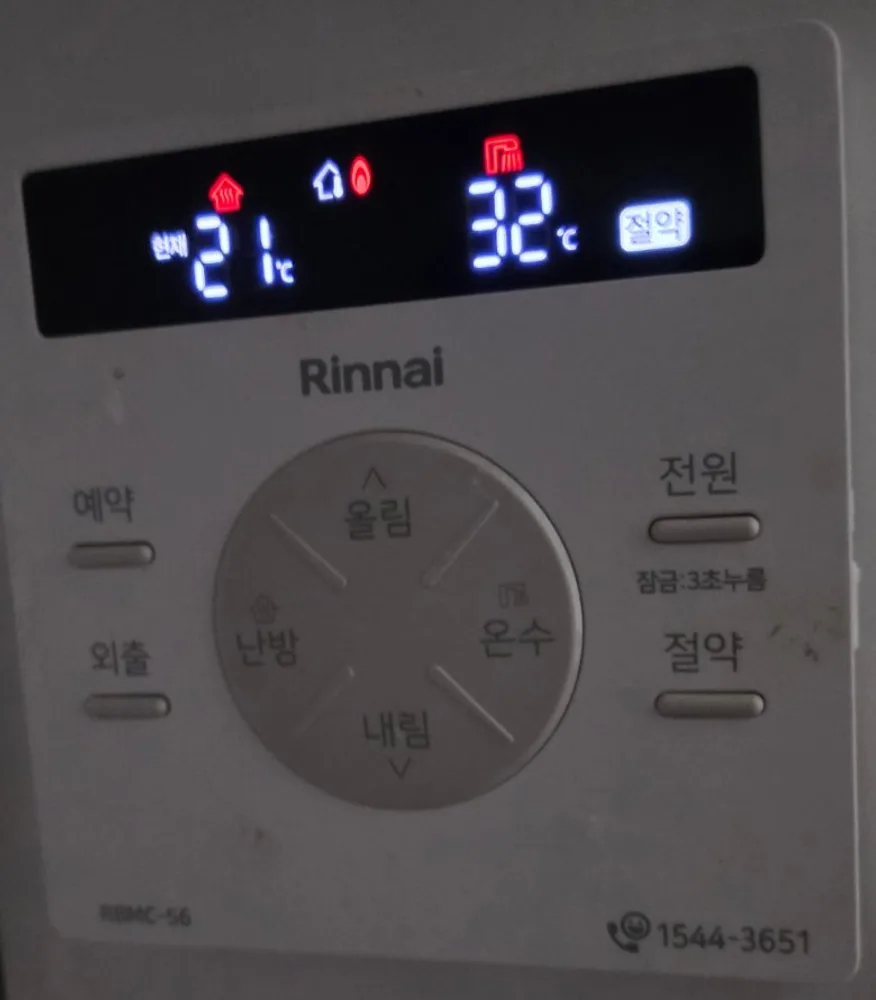
A white Rinnai panel with a black glass screen: a round pad in the middle (올림 up, 내림 down, 난방 heating, 온수 hot water), 예약 and 외출 on the left, 전원 and 절약 on the right.
Nous n'avons pas trouvé le manuel de ce modèle exact ; ces étapes viennent du modèle le plus proche. S'il réagit autrement, envoyez-nous une photo.
À quoi sert chaque bouton ?
1Screen · 표시부pyosibuLeft number: room temperature (현재 = current) with the heating mode icon above it. Right number: hot water °C. A flame means the burner is firing; 절약 lights when saving mode is on.
2Up · 올림ollimRaises the selected temperature (heating or hot water).
3Heating · 난방nanbangTurns heating on or off, and selects heating so 올림/내림 change the heating temperature.
4Hot water · 온수onsuSelects hot water so 올림/내림 change the hot water temperature.
5Down · 내림naerimLowers the selected temperature.
6Timer · 예약yeyakRuns heating in short bursts on a repeating cycle instead of nonstop. Press again to cancel.
7Away · 외출oechulKeeps the home just warm enough to stop pipes freezing. For trips of days, not a day at work. Press again (or 난방) to cancel.
8Power / hold 3 s = lock · 전원 (잠금: 3초 누름)jeonwon (jamgeum: 3cho nureum)Tap: controller on/off. Hold 3 seconds: button lock (printed under the button). Hold 3 seconds again to unlock.
9Saving · 절약jeoryakEco mode: caps heating to use less gas. The 절약 box on the screen shows it is on. Press again to cancel.
10Rinnai A/S · 1544-3651Rinnai service number, printed on the panel.
Quel réglage choisir ?
Heating on at 20–22°C, left on when you go out; hot water 40–45°C.
Comment… ?
Allumer
1Tap 전원. The screen lights.
2Press 난방 to start heating.
Chauffer la pièce à une température
1Press 난방 so heating is on.
2Use 올림 / 내림 to set 20–22.
Partir quelques jours
1Press 외출 before a trip of several days.
2Back home: press 외출 again or press 난방.
Régler l'eau chaude
1Press 온수.
2Use 올림 / 내림; 40–45°C is enough for showers.
Éteindre
1Press 난방 to stop heating, or tap 전원 for everything.
2Buttons do nothing? The lock is on: hold 전원 for 3 seconds.
Que signifient les mots à l'écran ?
집 아이콘 (빨강)
Heating mode
Heating is on; the number under 현재 is the current room temperature.
현재
Current
The number shown is the room's current temperature, not the target.
불꽃
Burning
Burner firing right now.
샤워 아이콘 + °C
Hot water
Hot water temperature setting.
절약
Saving
Saving mode on.
Les pièges de ce modèle
전원 held 3 seconds locks every button; hold 3 seconds again to unlock.
절약 lowers the heat: if rooms stay cold, check the 절약 box on the screen is off.
Un code erreur s'affiche ?
If the boiler stops and a number blinks on the screen, note the number and call Rinnai A/S 1544-3651. First check the gas valve on the pipe under the boiler is open (handle parallel to the pipe).