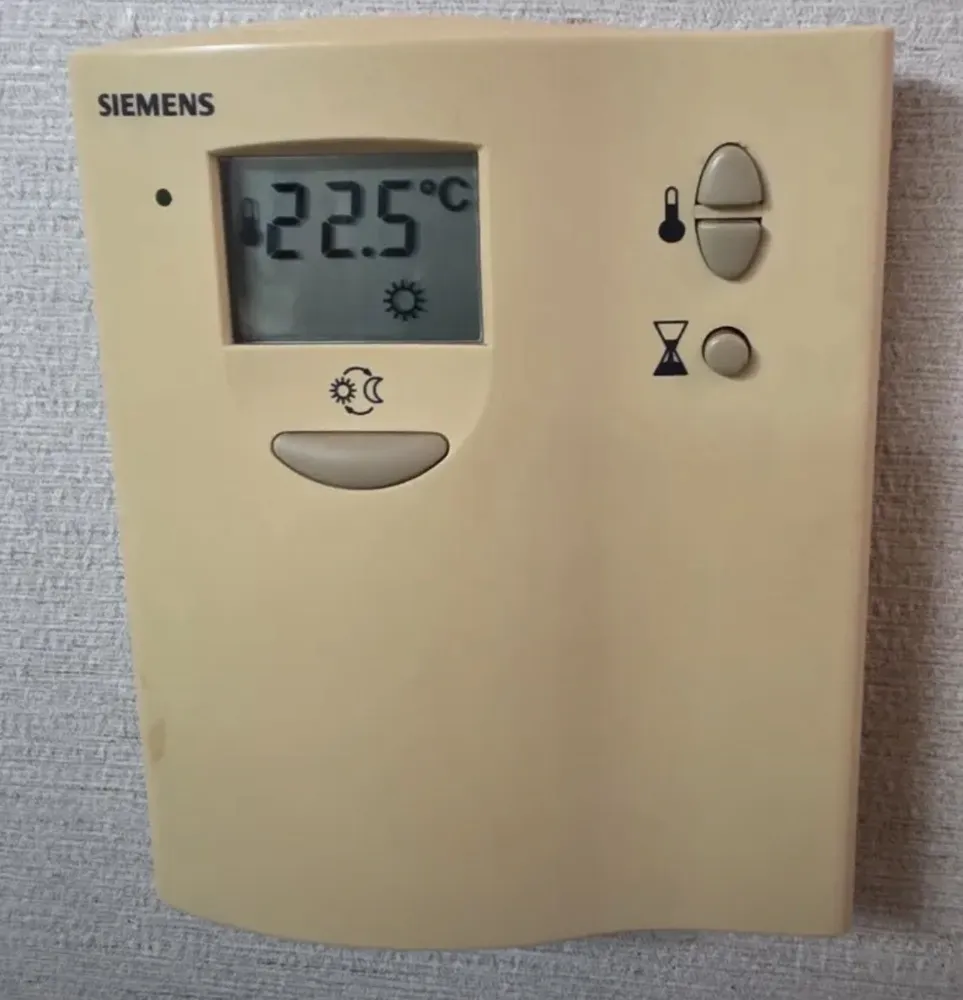
An older beige Siemens room thermostat that just opens or closes the heating valve for its zone: one button toggles Comfort (sun) and Economy (moon), two set the temperature.
¿Qué hace cada botón?
1Hole / lamp · Small hole on the casing (likely the sensor vent). Not a button.
2Room temperature · Measured room temperature (22.5°C). Pressing +/- shows and flashes the setpoint instead.
3Comfort mode mark · ☀Sun = normal (comfort) setpoint active. Moon = energy-saving setpoint.
4Warmer · 🌡 +Press once to show the setpoint, again to raise it 0.5°C (5-35°C). Saves after 5 s.
5Colder · 🌡 −Lowers the setpoint by 0.5°C.
6Hourglass: auto-revert time · ⧗Sets how long a mode switch lasts before reverting (0.5-24 h). 00.0 = never reverts.
7Comfort / Economy · ☀/☾Switches between normal (sun) and energy-saving (moon) temperature.
¿Qué ajuste uso?
Comfort ☀ 21-22°C, Economy ☾ 16-17°C at night or when out. Leave ⧗ at 00.0 unless you want automatic return.
¿Cómo…?
Encender
1It is always on (mains or AAA batteries). If the screen is blank, replace the 2 AAA batteries (RDD10.1).
Calentar la habitación a una temperatura
1Make sure the sun ☀ shows (press ☀/☾ if you see the moon).
2Press 🌡+ once; the setpoint flashes.
3Press 🌡+ or 🌡− until it reads 22.0.
4Wait 5 seconds; it saves and shows the room temperature again.
Salir unos días
1Press ☀/☾ so the moon ☾ shows.
2Set the moon setpoint about 16°C: with ☾ showing press 🌡− until 16.0.
3Press ☀/☾ again when you are back.
Programar
1Press ⧗ once; the hours flash.
2Use 🌡+/− to pick 0.5-24 h.
3Now pressing ☀/☾ switches mode only for that long, then it reverts on its own. Set 00.0 to turn this off.
Apagar
1Switch to ☾ and set its setpoint to 0°C, which means OFF. Only do this outside the cold season: there is a frost risk.
¿Qué significan las palabras de la pantalla?
☀
Comfort
Normal setpoint in use.
☾
Economy
Energy-saving setpoint in use (if economy is set to 0°C the controller is OFF).
🔥 / heat symbol
Heating on
Valve open, zone heating.
🌡
Room temp shown
Number is the measured room temperature.
battery
Replace batteries
Battery model (RDD10.1): replace the 2 × AAA within two weeks.
Trampas de este modelo
The setpoint you edit belongs to whichever mode (sun or moon) is showing. Check the icon first.
Economy at 0°C = no heating at all (frost risk).
What the ☀/☾ button does with a timer depends on an installer DIP switch, so the auto-revert may go either direction.