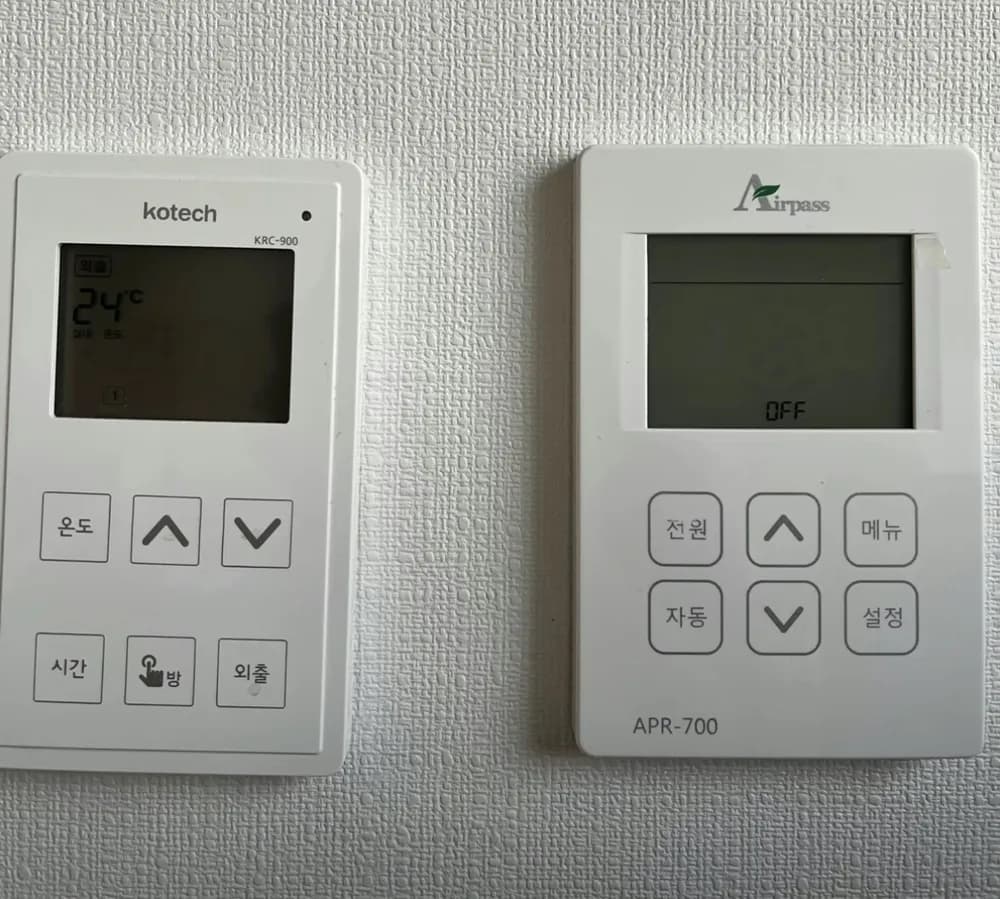
Kotech KRC-900 explicado

A per-room wall thermostat from a Kotech multi-room (각방) system: each room has one, the living-room unit is the master, and you mostly just set a target room temperature with ∧/∨.
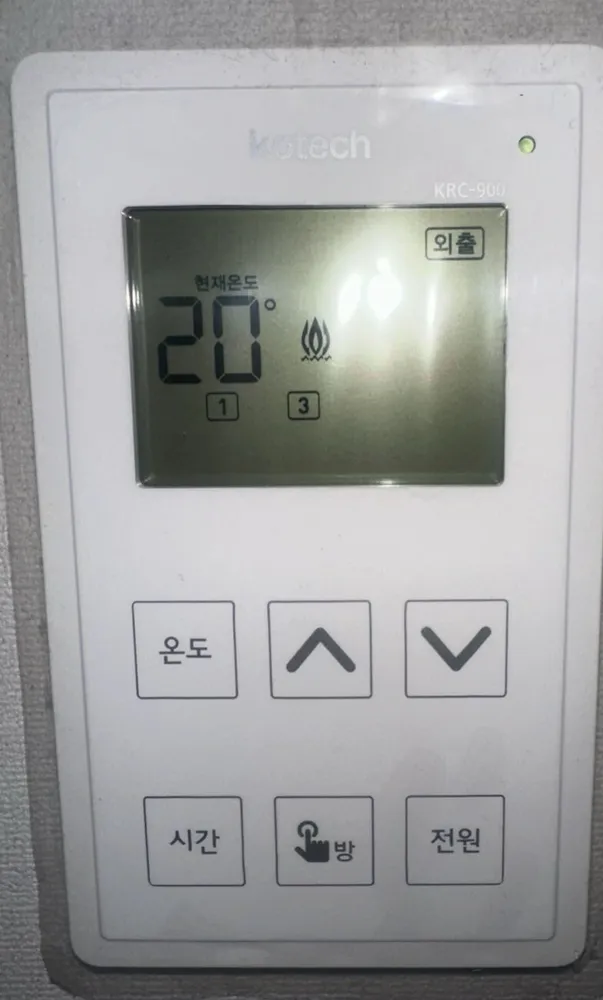
¿Qué hace cada botón?

Panel de caldera Kotech KRC-900 en una vivienda de Seúl
  1. 1Power lamp · Small LED. On means the controller has power from the valve control box under the kitchen sink.
  2. 2Away indicator · 외출oechulShows when this room is in Away mode. Away fixes the target at 5°C, so in practice the room is off but protected from freezing.
  3. 3Current room temperature · 현재온도hyeonjae ondoThe temperature the thermostat measures in this room right now.
  4. 4Flame icon · Heating is running for this room (its floor valve is open).
  5. 5Room number · 1 · 3Boxed number = which room this unit controls or which room you selected. Next to the flame it means that room is heating.
  6. 6Temperature mode · 온도ondoPuts the room in temperature mode, then use ∧/∨ to set the target. Heat runs whenever the room is colder than the target.
  7. 7Up · ∧Raises the value shown (target temperature, hours or minutes). Steps of 1°C.
  8. 8Down · ∨Lowers the value shown.
  9. 9Timer mode · 시간siganCycle heating: X minutes on, then Y hours off, repeating (see timer recipe). Overrides the temperature target.
  10. 10Room select · 방bangOn the living-room (master) unit only: steps through room numbers so you can set another room from here. On bedroom units it just flashes the room number.
  11. 11Power · 전원jeonwonTurns this room's control on. On the older dial version this key is labelled 외출 and works as on / Away (5°C). See notes.

¿Qué ajuste uso?

Temperature mode, 20-22°C in rooms you use, 18°C in empty rooms. Use Away (5°C) for trips instead of pulling any plug.

¿Cómo…?

Encender

  1. 1Press 전원 (on the dial version: 외출) once.
  2. 2The screen lights up and shows 현재온도 (current) and the set temperature.

Calentar la habitación a una temperatura

  1. 1Press 온도.
  2. 2Press ∧ or ∨ until the set number reads 22.
  3. 3Wait about 5 seconds; it saves on its own.
  4. 4A flame appears while the room is below 22°C.

Salir unos días

  1. 1Press 전원 (dial version: 외출) while the unit is on.
  2. 2외출 appears; the target drops to 5°C so pipes cannot freeze.
  3. 3To come back, press it again and re-check the set temperature.

Programar

  1. 1In temperature mode press 시간 once.
  2. 2Set the OFF gap in hours with ∧/∨ (1-24 h).
  3. 3Press 시간 again and set the ON time in minutes: 3, 4, 5, 6, 9, 12, 15, 20, 25, 30 or 60.
  4. 4Example 3 h / 15 min = heats 15 min, rests 3 h, repeats.
  5. 5While in timer mode the target is fixed at 30°C, so heat stops early only if the room reaches 30°C.
  6. 6Press 온도 to go back to normal temperature mode.

Apagar

  1. 1For one room: set it to Away (press 전원 / 외출) or set the target below the current temperature.
  2. 2Whole flat off: on the living-room unit hold 외출/전원 for about 3 seconds until OFF shows (living-room unit only). Hold 3 seconds again to undo.

¿Qué significan las palabras de la pantalla?

현재온도Current tempMeasured room air temperature.
설정SetYour target temperature (shown on the right when in temperature mode, e.g. photo 25 shows 22 now / 20 set).
온도Temperature modeBox lit at top-left of the screen = temperature mode is active.
시간Timer modeTimer (cycle) mode active; the screen shows hours (시) and minutes (분).
외출AwayRoom held at 5°C (frost protection only).
🔥 + room boxHeatingValve open / boiler or district water flowing to that room. Room box without flame = that room is not heating.
LoFrost protectionRoom fell below 5°C, so the system heats automatically until about 8°C.
OFFSystem offAll rooms switched fully off from the living-room unit (no heating, no hot-water control).

Trampas de este modelo

  • The 방 (room) button only works on the living-room master unit. Pressing it in a bedroom does nothing useful; that is not a fault.
  • Timer mode ignores your target (it is locked at 30°C) and just runs X minutes every Y hours, so it can overheat a small room.
  • Do not unplug the valve control box under the sink to 'save money': it turns the valves every 72 h to stop them seizing, and on some systems unplugging leaves the valves open.
  • With an individual boiler, one room's valve stays open even when every room is off. That is deliberate overheat protection, not a leak.
  • Photo 64 version has 외출 where photo 04 has 전원; photo 25 is an unbranded unit with the same buttons. Behaviour should match, but check the screen after each press.

¿Sale un código de error?

If the screen is blank, check that the valve control box under the sink is plugged in. If its lamp is on and the room is still cold, the actuator or valve has likely failed: that needs a repair visit.

Servicio técnico (coreano): Not printed on panel. Kotech HQ: 031-730-0490 (from the manual).
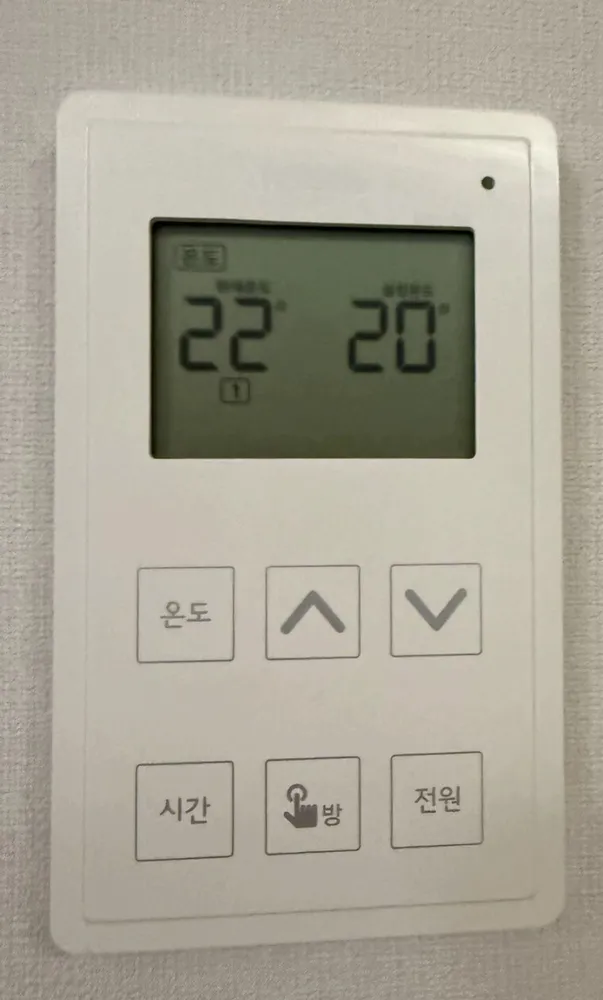
Panel de caldera Kotech KRC-900 en una vivienda de SeúlPanel de caldera Kotech KRC-900 en una vivienda de Seúl

Lee la guía completa de calefacción en Corea →

¿No encuentras tu panel?

Envía una foto. Te lo explicamos en inglés.

Al enviar, aceptas nuestra política de privacidad.

Fuentes