Samsung BAHA room controller — no model printed 영어 설명
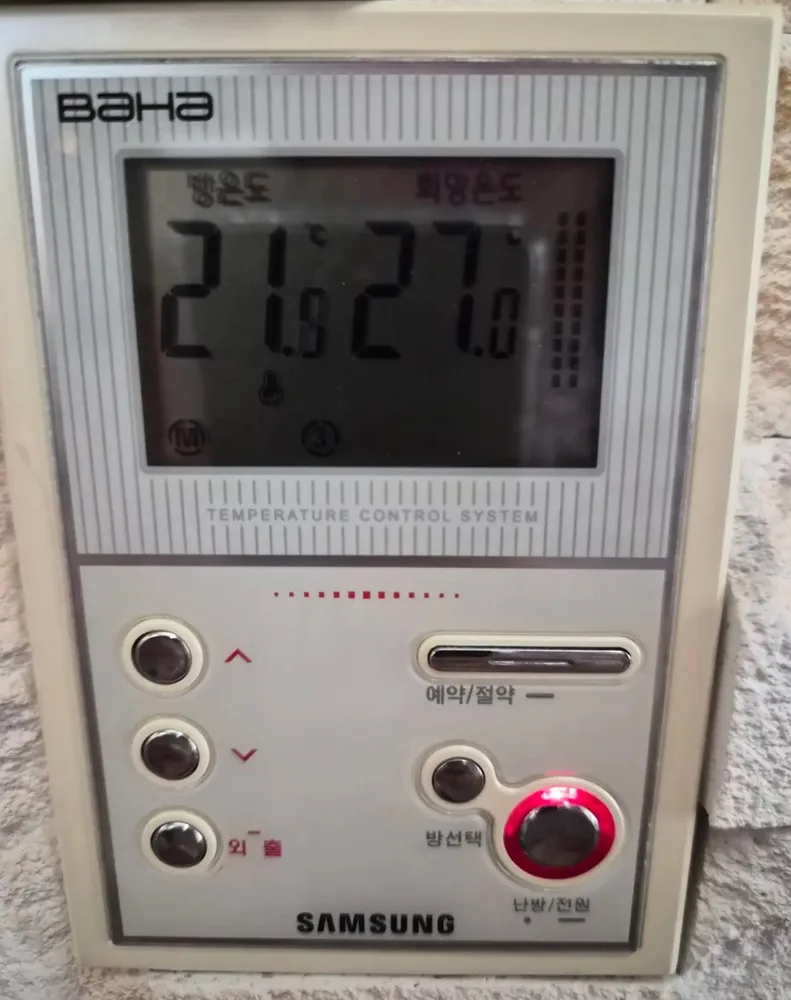
A Samsung BAHA room controller, common in older apartments. The screen shows the room temperature and the temperature you want; buttons for up/down, away, timer/saving, room select and heating/power.
이 모델의 설명서를 찾지 못해 가장 비슷한 모델 기준으로 정리했어요. 다르게 작동하면 사진을 보내주세요.
각 버튼은 무슨 기능인가요?
1Room temperature · 방온도bang ondoThe temperature in the room right now (21.5°C in this photo).
2Wanted temperature · 희망온도huimang ondoThe temperature you have set (27.0°C in this photo). Change it with ∧ / ∨.
3Bar display · 막대 표시A bar graph beside the numbers. Its meaning is not printed on the panel.
4M icon · ⓂA mode icon. Its meaning is not printed on the panel.
5Room number · ③Most likely the room you are viewing or changing (room 3 here). 방선택 switches rooms.
6Up · ∧ollimRaises the wanted temperature.
7Down · ∨naerimLowers the wanted temperature.
8Away · 외출oechulAway mode for when nobody is home.
9Timer / Saving · 예약/절약yeyak/jeoryakTimer (예약) and energy-saving (절약) functions share this button. The dash beside 절약 suggests a press-and-hold for saving (not confirmed).
10Room select · 방선택bang seontaekSteps to the next room so you can set each room separately.
11Heating / Power · 난방/전원nanbang/jeonwonThe big button with the red ring. The dot under 난방 and the dash under 전원 suggest a short press for heating and a press-and-hold for power (not confirmed). Red ring lit = on.
어떤 설정이 좋나요?
Your room on 21–22°C with heating on and left on. Use 외출 when away in winter. Avoid 예약/절약 unless you know what it does on your unit.
어떻게 하나요?
켜기
1Press the big 난방/전원 button. The red ring lights.
실내 온도 맞추기
1Check the room number on the screen. Press 방선택 until it shows your room.
2Press ∧ / ∨ until 희망온도 shows 21–22.
며칠 집 비울 때
1Press 외출 when nobody will be home. Press it again when you are back (not confirmed on this model).
끄기
1Press and hold 난방/전원 (the dash under 전원 suggests a long press). In freezing weather prefer 외출 so pipes stay safe.
화면 글자는 무슨 뜻인가요?
방온도 21.5
Room temperature
Temperature in the room right now.
희망온도 27.0
Wanted temperature
The temperature you set. Heating runs until the room reaches it.
③
Room number
Most likely the room currently shown.
Red ring
On
The heating/power button is lit: the controller is on.
이 모델에서 자주 헷갈리는 점
Each room can have its own setting: check the room number on the screen before changing anything.
희망온도 (right) is what you set; 방온도 (left) is what the room actually is. Setting 27°C makes the boiler run almost nonstop.
There is no hot-water setting on this panel. Hot water is set on the boiler itself or by the building.
No manual for this panel is online, so this guide is based on the printed labels only.
에러가 떠요
No error codes are printed on this panel. If heating stops, switch off and on once with 난방/전원; if it keeps happening, call your building management office (관리사무소) first.
A/S: Not printed on the panel. Ask your building management office (관리사무소).